Seedance 2.5
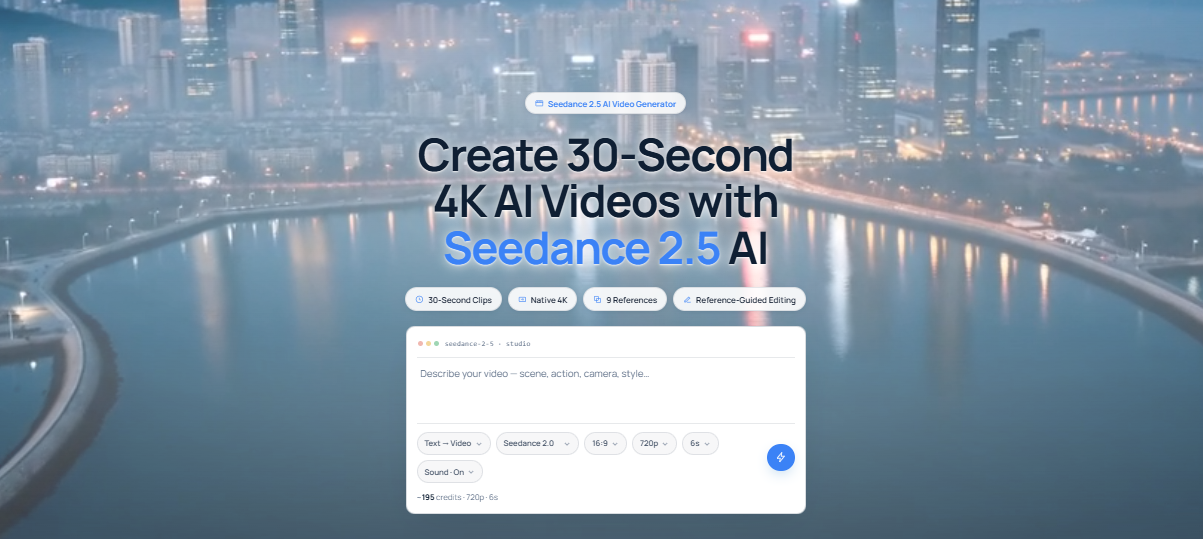
Fast AI video creation for creators and businesses.
What is Seedance 2.5
Seedance 2.5 is an AI-powered video generation model that helps users create short, high-quality videos from text descriptions or images. Built by ByteDance, it is designed to produce smooth animations, realistic motion, and visually consistent scenes with minimal effort.
If you are making marketing content, social media videos, product showcases, or creative projects, Seedance 2.5 simplifies the production process by handling much of the editing and animation automatically.
Seedance 2.5 Features
AI Text-to-Video
Turn written prompts into engaging videos without needing traditional video editing software.
Image-to-Video Generation
Animate still images to create realistic movement while preserving the original subject and style.
High-Quality Visual Output
Generate videos with sharp details, smooth transitions, and lifelike motion suitable for professional use.
Accurate Prompt Interpretation
The model understands detailed instructions, helping create videos that closely match your ideas.
Character Consistency
Maintain the same character or object appearance across multiple scenes using reference images.
Flexible Video Styles
Create cinematic clips, promotional videos, animations, product demonstrations, and social media content.
Fast Video Generation
Produce AI-generated videos within minutes, allowing creators to speed up their workflow.
Editing Support
Modify generated videos by changing prompts or reference media without starting the project from scratch.
Who should use Seedance 2.5?
Seedance 2.5 is suitable for a wide range of users, including:
- Content creators making YouTube, Instagram, or TikTok videos.
- Digital marketers creating advertisements and promotional campaigns.
- Small businesses producing product videos on a budget.
- Designers developing visual concepts and presentations.
- Filmmakers creating storyboards or pre-visualization clips.
- Advertising agencies producing client content.
- Educators making engaging educational videos.
- Freelancers offering AI video creation services.
How To use Seedance 2.5?
- Visit the Seedance platform and create an account.
- Choose whether you want to generate a video from text or an image.
- Enter your prompt or upload a reference image.
- Select your preferred video settings, such as duration and aspect ratio.
- Add reference images if you want consistent characters or visual style.
- Click the Generate button.
- Review the generated video.
- Refine the prompt or edit the output if necessary before downloading.
What We Like About Seedance 2.5
Excellent Video Quality
Produces realistic videos with smooth motion and impressive visual detail.
Supports Multiple Input Types
Creates videos from both text prompts and reference images.
Strong Prompt Understanding
Follows detailed instructions accurately for more relevant results.
Consistent Characters and Style
Maintains the appearance of characters and visual elements across scenes.
Time-Saving Workflow
Reduces the time needed to produce videos compared to traditional editing.
What We Don't Like About Seedance 2.5
Longer Videos Take More Time
Generating complex or lengthy videos can increase processing time.
Prompt Refinement
Complex ideas sometimes need multiple prompt adjustments.
Credit-Based Usage Limits
Monthly credit allowances may be restrictive.
Pricing Plans
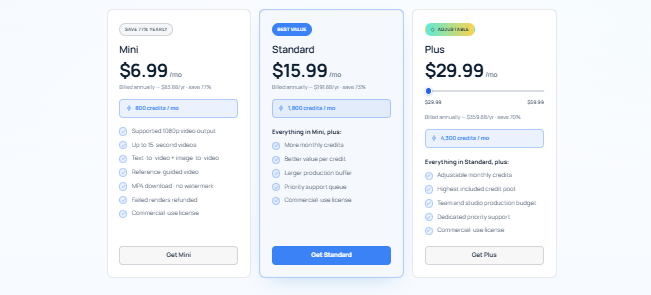
Mini – $6.99/month
- 800 credits per month
- Supports 1080p video output
- Create videos up to 5 seconds
- Text-to-video and image-to-video support
- Reference-guided video generation
- MP4 downloads (no watermark)
- Commercial use license
- Unused paid credits are refunded
Standard – $15.99/month
- 1,800 credits per month
- Includes everything in the Mini plan
- More monthly credits
- Lower cost per credit
- Larger production buffer
- Priority support
- Commercial use license
Plus – $29.99/month
- 4,300 credits per month
- Includes everything in the Standard plan
- Adjustable monthly credits
- Lowest cost per credit
- Team and studio production budget
- Dedicated priority support
- Commercial use license
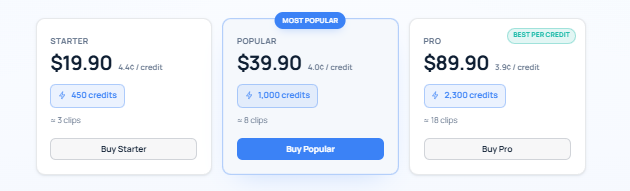
Credit Packs
Starter – $19.90
- 450 credits
- Approximately 3 video clips
- About 4.4¢ per credit
Popular – $39.90
- 1,000 credits
- Approximately 8 video clips
- About 4.0¢ per credit
Pro – $89.90
- 2,300 credits
- Approximately 18 video clips
- About 3.9¢ per credit
FAQs About Seedance 2.5
Is Seedance 2.5 free to use?
Seedance 2.5 may offer limited free access or trial options, while advanced features require a paid subscription.
Can Seedance 2.5 generate videos from images?
Yes. It supports image-to-video generation by animating uploaded images into short video clips.
Can beginners use Seedance 2.5?
Yes. Its simple interface makes it easy for beginners to start creating AI-generated videos.
What types of videos can I create?
You can create marketing videos, social media content, product showcases, educational videos, concept animations, and more.
Conclusion
Seedance 2.5 is a powerful AI video generation tool that makes creating professional-looking videos faster and easier. Its ability to transform text and images into high-quality animations makes it useful for creators, marketers, businesses, and educators.