Otter AI
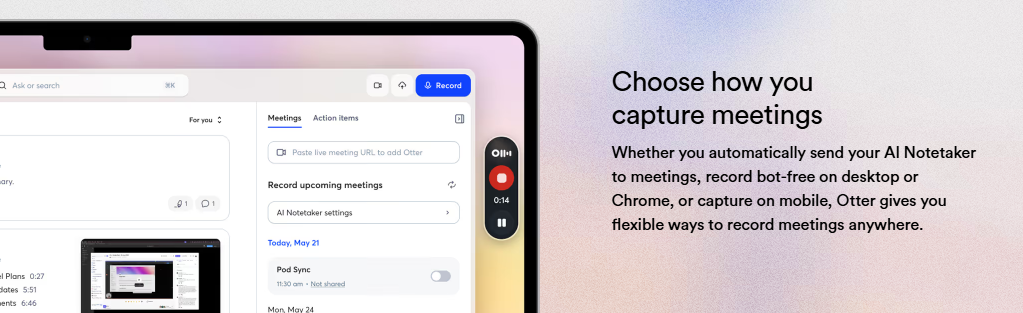
Otter AI creates summaries, insights, and follow-ups automatically
Otter AI is a tool that helps you record, transcribe, and organize your meetings by using AI. It captures conversations in real time and turns them into clear summaries and action items. Staying focused becomes easy while keeping all your important information in one place, especially if you are a student, professional, or part of a team.
Features Of Otter AI
Live Transcription
Turns spoken words into text in real time during meetings.
Auto Summaries
Creates short summaries with key points and decisions.
AI Chat
Let you ask questions and get answers from past meetings.
Speaker Identification
Shows who is speaking in the conversation.
Flexible Recording
Record meetings using mobile, desktop, or auto-join.
Integrations
Works with tools like Zoom, Google Meet, Slack, and Salesforce.
Action Items
Automatically finds tasks and next steps from meetings.
Use Cases Of Otter AI
Sales
Saves call notes and helps with follow-ups.
Education
Records lectures and turns them into notes.
Media
Transcribes interviews and helps create content.
Recruiting
Stores interview notes and candidate insights.
SDR Work
Helps qualify leads and book meetings.
General Use
Useful for anyone who wants organized meeting notes.
How To Use Otter AI
Sign Up
Create an account and connect your calendar.
Join Meetings
Let Otter auto-join or record manually.
Live Notes
See transcription during the meeting.
Get Summary
View key points after the meeting ends.
Edit & Share
Make changes and share notes with your team.
What We Like About Otter AI
- Easy to Use: Simple interface for beginners.
- Good Accuracy: Works well when the audio is clear.
- Smart Features: AI Chat and summaries are very useful.
- Strong Integrations: Connects with many popular tools.
What We Don't Like About Otter AI
- Accuracy Issues: Can struggle with noise or accents.
- Paid Features: Advanced tools require a subscription.
Otter AI Pricing Plans
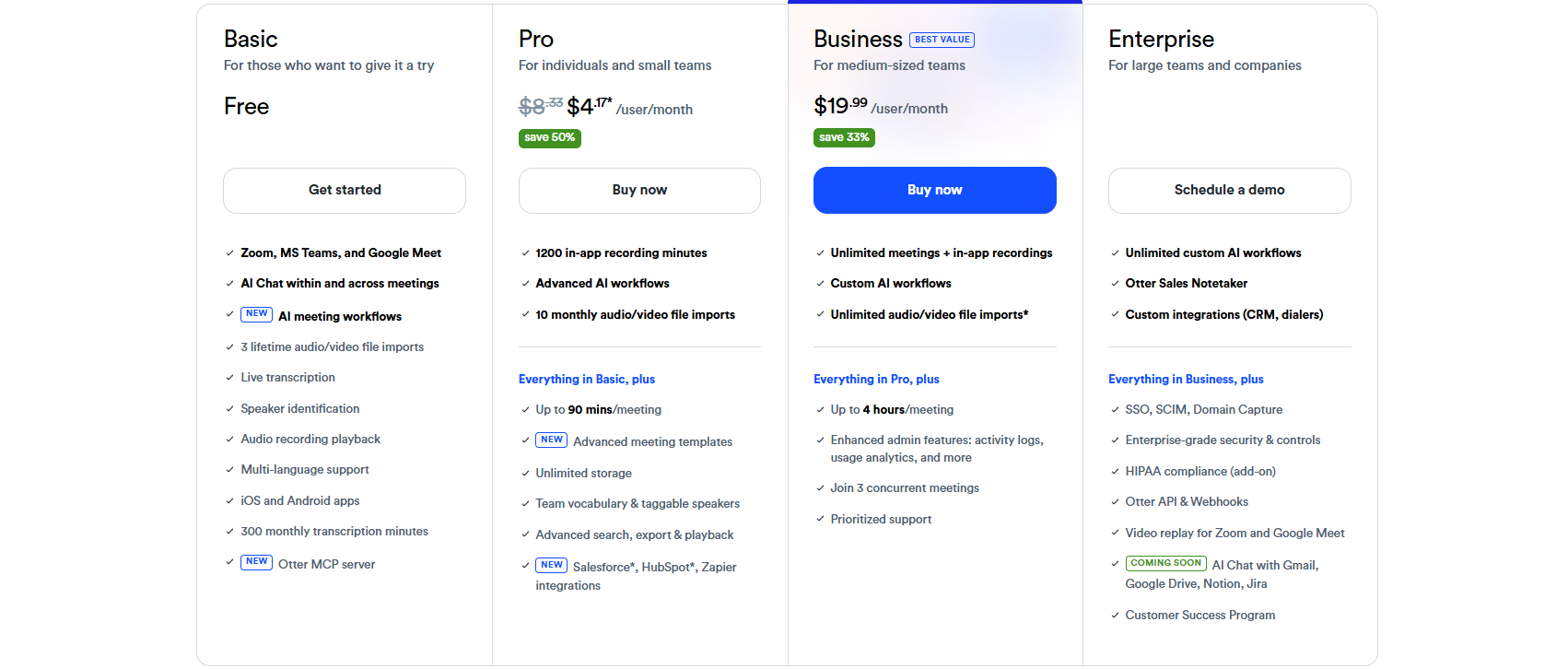
Basic Plan
- Free plan for beginners
- Works with Zoom, MS Teams, and Google Meet
- AI chat and meeting workflows included
- 300 transcription minutes per month
- 3 lifetime audio/video file uploads
- Live transcription and speaker identification
- Multi-language support
- iOS and Android apps
Pro Plan - $4.17/month
- 1200 recording minutes
- Up to 90 minutes per meeting
- Unlimited storage
- 10 monthly audio/video file imports
- Advanced AI workflows
- Advanced search, export, and playback
- Team vocabulary and speaker tagging
- Integrations with Salesforce, HubSpot, and Zapier
Business Plan - $19.99/month
- Unlimited meetings and recordings
- Up to 4 hours per meeting
- Unlimited audio/video file imports
- Custom AI workflows
- Join up to 3 meetings at once
- Admin features like activity logs and usage analytics
- Priority support
Enterprise Plan - Custom Pricing
- Unlimited custom AI workflows
- Otter Sales Notetaker
- Custom CRM and dialer integrations
- Enterprise-grade security and controls
- SSO, SCIM, and domain capture
- HIPAA compliance (add-on)
- API and webhooks
- Video replay for Zoom and Google Meet
- Customer success program
FAQs About Otter AI
What is Otter AI?
Otter AI is an AI tool that records, transcribes, and summarizes meetings
Is Otter AI free?
Yes, it offers a free plan with limited features
Can Otter AI join meetings automatically?
Yes, it can auto-join platforms like Zoom and Google Meet
Does Otter AI support integrations?
Yes, with tools like Slack and Salesforce
Conclusion
Otter AI goes beyond simple note-taking by helping you turn conversations into useful insights you can actually use. From improving teamwork to saving hours of manual work, it fits easily into daily workflows and supports better decision-making. Overall, a great tool for anyone looking to work smarter and stay organized.
Alternatives To Otter AI
Fathom AI
Records, transcribes, and summarizes meetings.
Krisp AI
Removes noise and helps with clear calls and meeting notes.