
Semgrep
What is Semgrep?
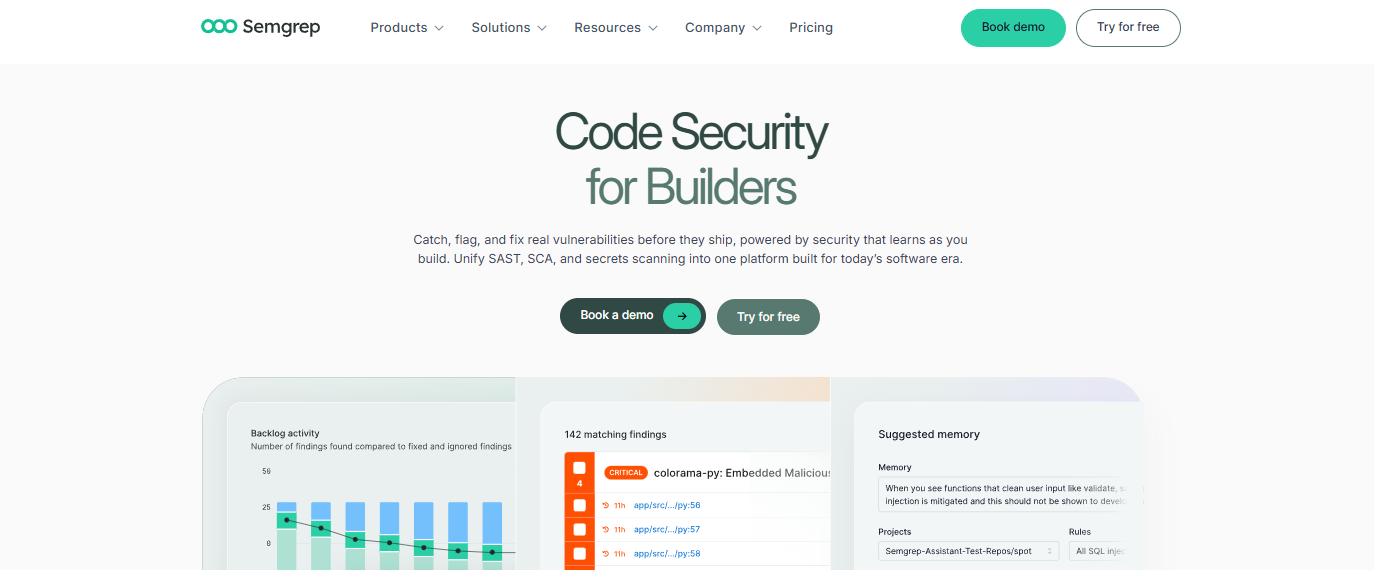
Semgrep is a static code analysis (SAST) tool that is not only free to use but also open source. With Semgrep, developers can spot coding issues, security flaws, and quality problems well before the software is deployed.
Semgrep examines the structure of the source code, resulting in highly accurate outputs and much fewer false positives. It is compatible with several programming languages and permits teams to use rules included in the library or to set up custom rules that best suit coding conventions and security needs.
Features Of Semgrep
Accurate Code Analysis
Semgrep analyzes code structure to detect security issues more accurately.
Custom Rule Creation
Developers can build custom scanning rules.
Large Rule Library
It includes an extensive collection of community and officially maintained rules, allowing users to start scanning without creating rules from scratch.
Supports Multiple Languages
Supports many popular programming languages and frameworks.
Fast Performance
The lightweight scanning engine delivers quick results, making it practical for frequent scans during development.
CI/CD Integration
Semgrep can be integrated into continuous integration and deployment pipelines.
IDE Support
Developers can run scans directly within supported code editors, helping identify issues while writing code.
Developer-Friendly Rules
The rule syntax is easy to understand, allowing even developers with limited static analysis experience to customize scans.
Context-Aware Detection
Semgrep can reduce unnecessary alerts and improve the accuracy of findings.
Use Cases Of Semgrep
- Detect security vulnerabilities before putting the code into production.
- Ensure secure coding standards are followed by all development teams.
- Set up auto-scanning of pull requests as part of CI/CD workspaces.
- Detect potential security issues from API usage or unsafe coding practices.
- Keep the same coding style and practices in large projects.
- Automate security as part of code reviews.
- Customize security rules for different teams and products of the organization.
How To Use Semgrep
Install Semgrep
Install Semgrep by following the official installation instructions for your operating system. Once installed, verify that it's working correctly before scanning your code.
Choose or Create Rules
Start with Semgrep's built-in rule sets for common security checks.
Run a Code Scan
Execute a scan on your project directory using the Semgrep command-line interface.
Review the Results
Examine the scan report, which highlights the affected files and explains why each issue was flagged.
Fix Identified Issues
Update your code to address the reported vulnerabilities or coding mistakes.
Integrate with Your Development Workflow
Add Semgrep to your CI/CD pipeline or connect it with your preferred IDE so code is automatically scanned during development, pull requests, or deployments.
Maintain and Update Rules
Regularly review and update your rule sets as your codebase evolves.
What We Like About Semgrep
Easy
Easy to install and start using.
Broad Language Support
Supports many popular programming languages.
Customizable Rules
Flexible custom rule creation for different projects.
Fast Scanning
Fast scanning with minimal impact on development workflows.
Open-Source Community
Open-source with an active developer community.
Workflow Integration
Integrates well with IDEs and CI/CD platforms.
What We Don't Like About Semgrep
Manual Review Needed
Some complex security issues still require human analysis.
Performance Tuning
Large projects with extensive rule sets may need scan optimization.
Semgrep Pricing Plans
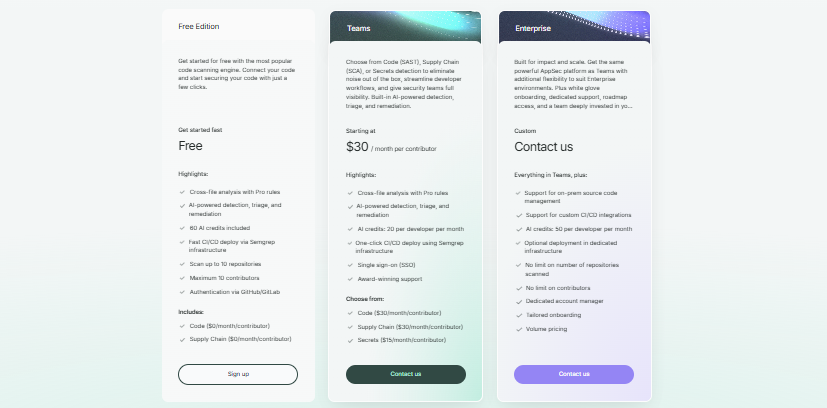
Free Edition
- Includes AI-powered detection, triage, and remediation.
- Supports CI/CD deployment.
- Scans up to 10 repositories.
- Maximum 10 contributors.
- GitHub and GitLab authentication included.
Teams- Starts at $30/month per contributor
- Includes Code (SAST), Supply Chain (SCA), or Secrets scanning.
- AI-powered detection and remediation.
- Up to 20 AI credits per developer each month.
- Single sign-on (SSO) and award-winning support.
Enterprise - Custom pricing
- Includes everything in Teams.
- Supports on-premise deployments.
- No limits on repositories or contributors.
- Dedicated account manager and tailored onboarding.
- Volume pricing available.
FAQs About Semgrep
Is Semgrep free to use?
Yes. Semgrep offers an open-source version that developers can use for static code analysis.
Which programming languages does Semgrep support?
Semgrep supports many widely used programming languages, making it suitable for modern software projects built with multiple technologies.
Can Semgrep be integrated into CI/CD pipelines?
Yes. It can automatically scan code during builds, pull requests, and deployments, helping teams catch issues early in the development lifecycle.
Can developers create their own scanning rules?
Yes. Semgrep supports custom rules, allowing organizations to enforce project-specific coding and security standards.
Is Semgrep suitable for beginners?
Yes. Its rule syntax is relatively easy to understand, and users can begin with community-provided rule sets before creating their own.
Conclusion
Semgrep offers an extremely practical static application security tool for developers and their teams seeking greater security in their code, without introducing excessive burden into their established development processes.
Its ability to perform swift scanning across various programming languages, flexibility through its customizable rulesets, and integration into modern development environments make it a better choice for many.


