
KNIME
Low-code platform for analytics, automation, and machine learning
What is Knime?
KNIME is a low-code data analytics platform that helps users collect, prepare, analyze, and visualize data through a drag-and-drop interface. It also supports machine learning, workflow automation, and integrations with Python, R, databases, and cloud services.
Key Features Of Knime
Visual Workflow Builder
Create workflows with drag-and-drop tools instead of writing long code.
Data Preparation
Clean and organize data by joining, filtering, sorting, and grouping information.
Workflow Automation
Automate repetitive tasks with reusable workflows.
Machine Learning
Build, train, and test machine learning models using ready-made nodes.
Data Integration
Connect to databases, Excel files, cloud apps, APIs, and many other data sources.
Flexible Workflow Design
Easily update workflows by adding, removing, or rearranging nodes.
Workflow Documentation
Explain each step with notes, labels, and grouped sections for better teamwork.
Low-Code Analytics
Analyze data with little coding, making it easier for beginners to use.
Python and R Support
Extend your workflows by adding custom Python or R scripts when needed.
Power BI Integration
Prepare clean data before sending it to Power BI for reporting.
Workflow Scheduling
Run workflows automatically at a scheduled time without manual work.
Parallel Processing
Speed up many workflows by running multiple tasks at the same time.
Industry Extensions
Access special tools built for healthcare, life sciences, and data science projects.
Reusable Components
Reuse workflow parts to complete similar projects more quickly.
Cross-Platform Support
Use KNIME on Windows, macOS, and Linux.
Use Cases Of KNIME
There are many use cases of KNIME in many professions:
Data Analysts
Prepare, clean, and analyze business data.
Business Analysts
Create workflows and generate business insights.
BI Developers
Prepare data for dashboards and reports.
Data Engineers
Build ETL pipelines and automate data flows.
Machine Learning Engineers
Develop and manage AI workflows.
Research Scientists
Analyze research and experimental data.
How to use KNIME?
- Download and install KNIME Analytics Platform.
- Import or connect your data source.
- Build a workflow using drag-and-drop nodes.
- Configure each node for your task.
- Run the workflow to process and analyze data.
- View, export, or share your results and reports.
Benefits Of Using KNIME
KNIME stands out as a very useful AI tool for these reasons:
Easy visual workflow builder
The drag-and-drop interface makes it simple to build and modify data pipelines without much coding.
Great for experimenting
It is easy to swap algorithms and test different machine learning workflows.
Good for data cleaning and ETL
Particularly useful for preprocessing, repetitive workflows, and visualizing data pipelines.
Specialized nodes
Especially valuable in chemistry and bioinformatics because of its domain-specific extensions.
Common criticisms about KNIME
KNIME has some issues related to performance issues and limited scalability.
Limited scalability
Several comments noted that KNIME struggles with large datasets and enterprise-scale pipelines.
Performance issues
Users reported slow execution on large datasets and limited multithreading within individual nodes.
Version control is weak
Managing workflows and code changes can be difficult compared to traditional code repositories.
Learning resources were once limited
Troubleshooting is a bit difficult, although documentation has improved over time.
KNIME Pricing Plans
The pricing plans of KNIME are listed below:
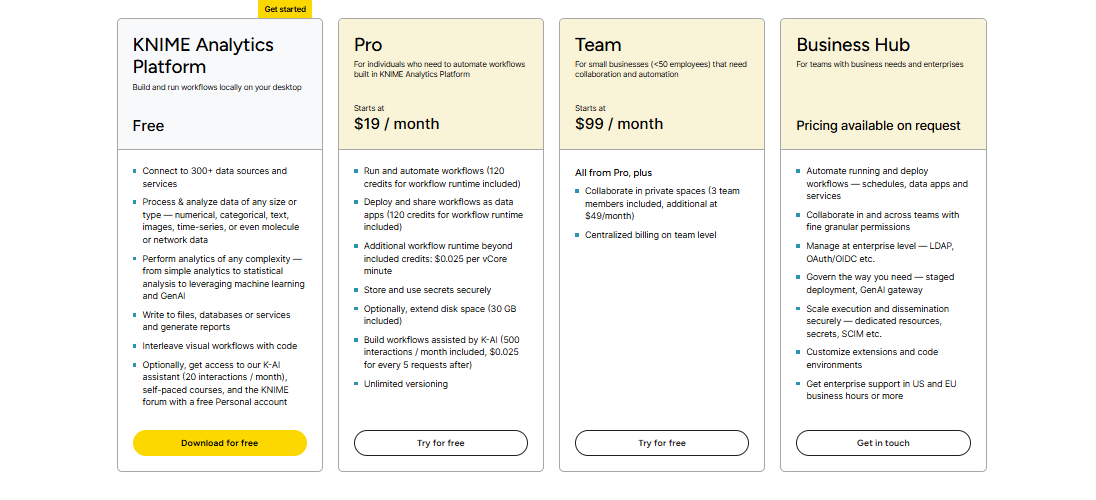
Free Plan
- Connect to 300+ data sources and services.
- Prepare and analyze different types of data.
- Build analytics and machine learning workflows.
- Create reports and connect to databases.
- Add code when needed.
- Get limited access to K-AI Assistant.
- Access free courses and the KNIME community.
Pro Plan – Starts at $19/month
- Run and automate workflows.
- Share workflows as data apps.
- Get workflow runtime credits.
- Store secrets securely.
- Build workflows with K-AI Assistant.
- Enjoy unlimited versioning.
- Buy extra runtime if needed.
Team Plan – Starts at $99/month
- Includes everything in the Pro plan.
- Collaborate in private team spaces.
- Supports up to 3 team members.
- Add extra members for an additional fee.
- Manage billing from one central account.
Business Hub – Custom Pricing
- Automate and deploy workflows.
- Build secure apps and services.
- Collaborate with advanced user permissions.
- Use enterprise authentication options.
- Access staging and GenAI gateway features.
- Add custom extensions and code.
- Receive enterprise-level support.
FAQs About KNIME
Is KNIME Python based?
No. KNIME is a low-code platform, but it supports Python integration.
Is KNIME in demand?
Yes. It is used in data analytics, ETL, and machine learning roles.
What is KNIME?
KNIME is a low-code platform for data analytics, automation, and machine learning.
Is KNIME hard to learn?
No. Its drag-and-drop interface makes it beginner-friendly.
Who is the CEO of KNIME?
Michael Berthold is the CEO of KNIME
Conclusion
KNIME is a practical choice for anyone who wants to work with data without relying heavily on code. It combines data preparation, analytics, automation, and machine learning in one platform, making everyday tasks faster and easier.


