Retool
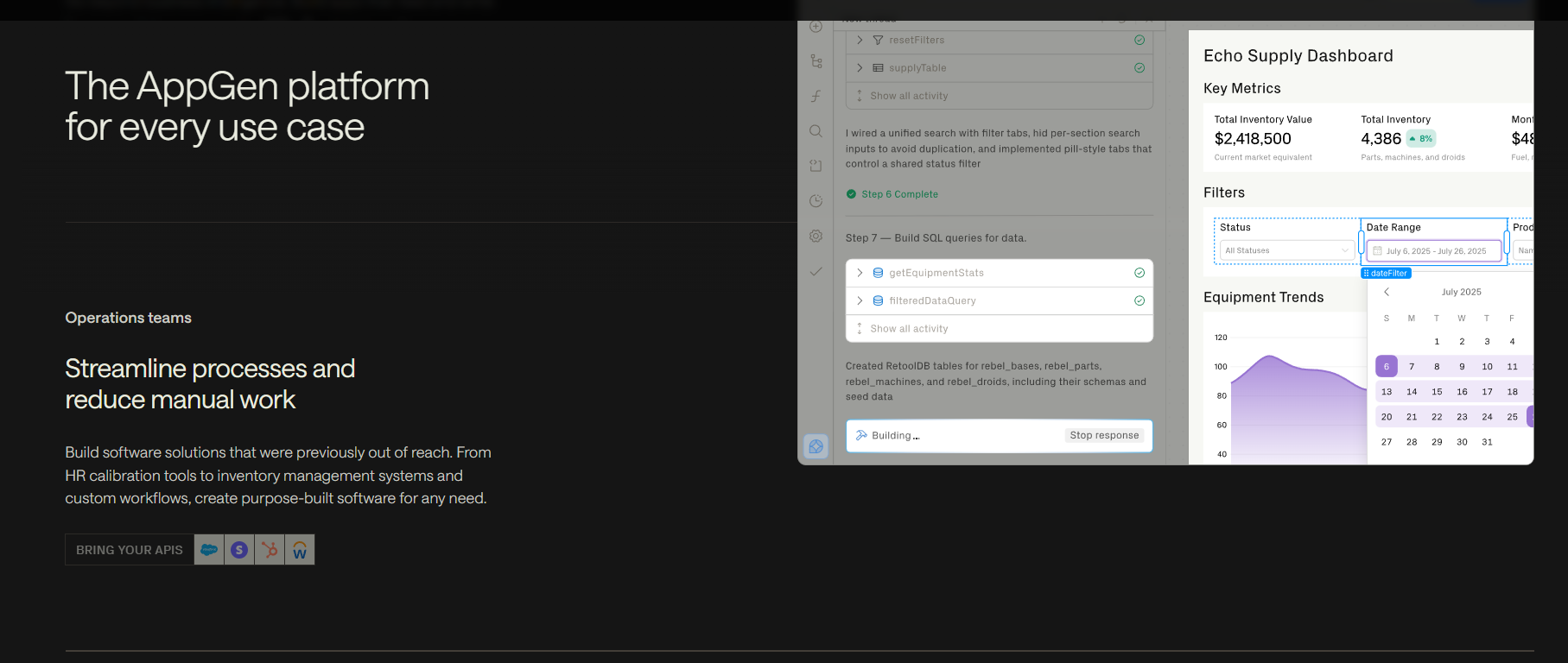
Create dashboards and workflows with Retool.
Retool is a tool that helps teams build internal apps at lightning speed. You definitely have to code every line by yourself. Just drag and drop components like tables, buttons, connect your data, and add some logic. Also, it uses AI to make the app even quicker. Retool allows you to put together dashboards, admin panels, and workflow tools in one go.
Features Of Retool
Visual Interface Builder
Retool has ready-made parts like tables and forms. Drag them in and set them up easily.
AI-Powered App Creation
The built-in AI assistant can create or update apps from text prompts. It generates interface elements, queries, and basic logic inside the platform.
Smart Workflows and Automation
Teams can build AI-driven queries for tasks like text writing, classification, and document data extraction.
Data Integrations
Retool connects to many databases and apps. It brings all your data into one place.
Developer Customization
You can write SQL queries and add JavaScript to components. This gives more control than most no-code tools.
Mobile App Support
Retool allows you to build apps for iOS and Android. It supports offline mode, barcode scanning, and push notifications.
External Portals
You can create portals for customers or partners. These include login systems and role-based permissions.
Security and Version Control
Retool offers role-based access, audit logs, SSO, and Git sync. However, Git works mainly for syncing changes, not full branching.
Self-Hosting Option
Companies can host Retool on their own servers. This gives more data control but requires DevOps support.
Use Cases Of Retool
Data Lookup Tools
Create simple tools that bring data from different systems into one screen.
Finance and Risk Apps
Build apps to track payments, approvals, and basic compliance tasks.
Task Automation Tools
Make tools that handle repeat tasks and simple workflows automatically.
Customer Overview Panels
Show all customer details from sales and support in one place.
Mobile Apps for Teams
Build mobile apps with offline use and alerts for field workers.
How To Use Retool
- Create an account and choose cloud or self-hosted deployment.
- Connect your preferred database or API.
- Drag interface components onto the builder canvas.
- Write queries using SQL or configure API calls.
- Add JavaScript for advanced interactivity.
- Test workflows and permissions.
- Deploy internally or share through secure access controls.
What We Like About Retool
Speed
Quickly build internal tools.
Integrations
Connect to databases, APIs, and online tools easily.
Flexibility
Use drag-and-drop tools. Add SQL and JavaScript when needed.
Mobility
Create apps for iOS and Android. Use them offline.
Automation
Use AI to create apps and handle simple workflows.
Security
Set user roles, enable SSO, and track activity with logs.
What We Don't Like About Retool
Performance
Large or complex dashboards may become slower over time.
Pricing
Advanced features like SSO and Git sync require higher-tier plans.
Portability
Apps cannot be fully exported outside the platform.
Customization
Design freedom is limited by the built-in grid structure.
Maintenance
Self-hosting requires ongoing DevOps management.
Retool Pricing Plans
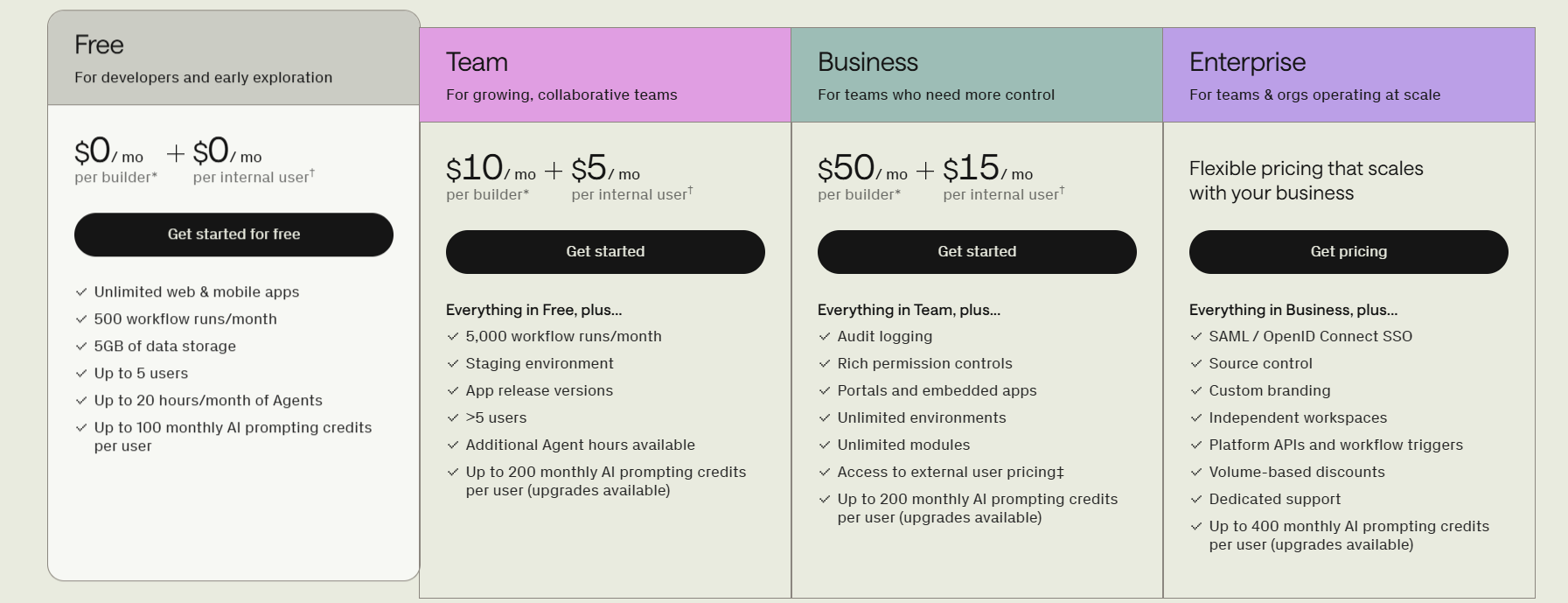
Free Plan — $0/month
- Pricing:
- $0/month per builder
- $0/month per internal user
- Includes:
- Unlimited web & mobile apps
- 500 workflow runs per month
- 5GB data storage
- Up to 5 users
- Up to 20 agent hours per month
- Up to 100 monthly AI prompting credits per user
Team Plan — $10/month + $5/month
- Pricing:
- $10/month per builder
- $5/month per internal user
- Everything in Free, plus:
- 5,000 workflow runs per month
- Staging environment
- App release versions
- More than 5 users
- Additional agent hours available
- Up to 200 monthly AI prompting credits per user (upgrades available)
Business Plan — $50/month + $15/month
- Pricing:
- $50/month per builder
- $15/month per internal user
- Everything in Team, plus:
- Audit logging
- Advanced permission controls
- Portals and embedded apps
- Unlimited environments
- Unlimited modules
- Access to external user pricing
- Up to 200 monthly AI prompting credits per user (upgrades available)
Enterprise Plan — Custom Pricing
- Pricing:
- Flexible pricing based on business needs
- Everything in Business, plus:
- SAML / OpenID Connect SSO
- Source control
- Custom branding
- Independent workspaces
- Platform APIs and workflow triggers
- Volume-based discounts
- Dedicated support
- Up to 400 monthly AI prompting credits per user (upgrades available)
FAQs About Retool
Is Retool suitable for non-technical users?
It is more friendly to technical teams. While it reduces coding effort, understanding SQL or JavaScript is often helpful.
Can I export the generated code?
No, applications remain within the Retool ecosystem.
Does Retool support AI features?
Yes, it includes AI-assisted app generation and workflow automation tools.
Is mobile app development supported?
Yes, native apps for iOS and Android can be built with offline support.
Can enterprises host it privately?
Yes, Retool offers self-hosting for organizations that need infrastructure control.
Conclusion
Retool is a great choice if your team values fast and orderly development more than the full freedom of design. It drastically cuts down the time necessary for internal apps development without compromising the level of customization of a developer. Conversely, a company looking for full code ownership, very detailed UI control, or minimal infrastructure overhead may discover some limitations.