
Snyk AI

AI security platform for secure software development.
What is Snyk AI?
Snyk AI is an AI cybersecurity platform for developers. It easily fixes security issues while writing code. It checks your code, open-source libraries, containers, and cloud settings for vulnerabilities.
Snyk AI Features
AI Code Scanning
As you write code, Snyk AI automatically runs scans to identify security vulnerabilities and prevent potential risks before they can grow into significant security incidents.
Open-Source Security Checks
Snyk AI assesses all of the open-source components your project relies on to check if any of them have known security exposures and warn you if they do.
Container & Cloud Protection
Snyk AI also protects your container deployments and cloud infrastructure to identify security risks and threats before deployment.
AI Fix Recommendations
Snyk AI goes beyond just finding security flaws. It actually provides remediation advice by automatically suggesting code changes that would address each vulnerability.
Developer Tool Integrations
Secure code scanning works hand-in-hand with developer tools like GitHub, GitLab, Bitbucket, Azure DevOps, and the most popular code editors to help you do secure code checks in the very same spot where you, the whole day, and your team are usually.
CI/CD Pipeline Support
Safety checks get automatically done with your software development workflow in the continuous integration and continuous delivery (CI/CD). For every new version of the software you create, it checks that the code is clean and the team gets informed about any problems before the program is finally released to the users of the product.
Use Cases Of Snyk AI
Software Developers
Find and fix security issues while coding.
DevSecOps Engineers
Automate security checks in development pipelines.
AppSec Engineers
Monitor and manage application vulnerabilities.
Cloud Engineers
Secure cloud configurations and containers.
Platform Engineers
Protect development infrastructure and platforms.
Engineering Managers
Track security issues across development teams.
Security Teams
Continuously monitor and reduce security risks.
How To Use Snyk AI?
- Create a free Snyk account.
- Connect your code repository, such as GitHub or GitLab.
- Let Snyk scan your project for security issues.
- Review the vulnerabilities it finds and read the AI-generated fix suggestions.
- Apply the recommended fixes and scan again to confirm the issues are resolved.
- Connect Snyk to your CI/CD pipeline or IDE, so every new code change is checked automatically.
What We Like About Snyk AI
Snyk AI is very easy to set up. The AI helps explain and fix vulnerabilities and supports many programming languages. It works well with popular developer tools. Also, there is a continuous security monitoring feature.
What We Don't Like About Snyk AI
Though Snyk AI is easy to set up, beginners may need time to understand security reports. For larger teams, the subscription part is expensive.
Snyk AI Pricing Plans
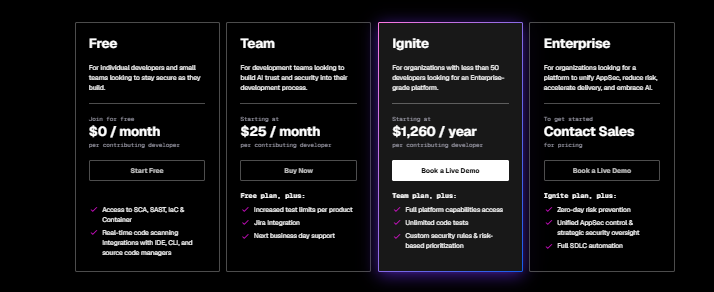
Free
- Scan code, open-source libraries, containers, and IaC
- Basic security testing
- Connect with IDEs, CI/CD, and source code repositories
Team — Starting at $25/month per contributing developer
- Everything in the Free plan
- Higher usage limits
- Team collaboration features
- Business-day support
Ignite — Starting at $1,260/year per contributing developer
- Full access to Snyk's security platform
- Unlimited code testing
- Advanced security controls
- Priority support
Enterprise — Contact Sales
- Everything in Ignite
- Advanced security governance
- Zero-day vulnerability protection
- SDLC automation
- Enterprise-level support and security management
FAQs About Snyk AI
Is Snyk AI free?
Yes. Snyk offers a free plan with basic security scanning features.
What does Snyk AI scan?
It scans source code, open-source dependencies, containers, and cloud configurations.
Can Snyk AI work with GitHub?
Yes. It integrates with GitHub, GitLab, Bitbucket, Azure DevOps, and other development tools.
Is Snyk AI good for teams?
Yes. The Team, Ignite, and Enterprise plans include collaboration and advanced security features.
Does Snyk AI fix vulnerabilities automatically?
It provides AI-powered recommendations and code fixes, but developers review and apply the changes.
Conclusion
Snyk AI simplifies application security by assisting developers in identifying and resolving vulnerabilities at an early stage of the development process. With its AI-driven suggestions, extensive list of integrations, and constant scanning, Snyk AI can be a great fit for individuals, teams, and bigger organizations wishing to build a more secure software.


