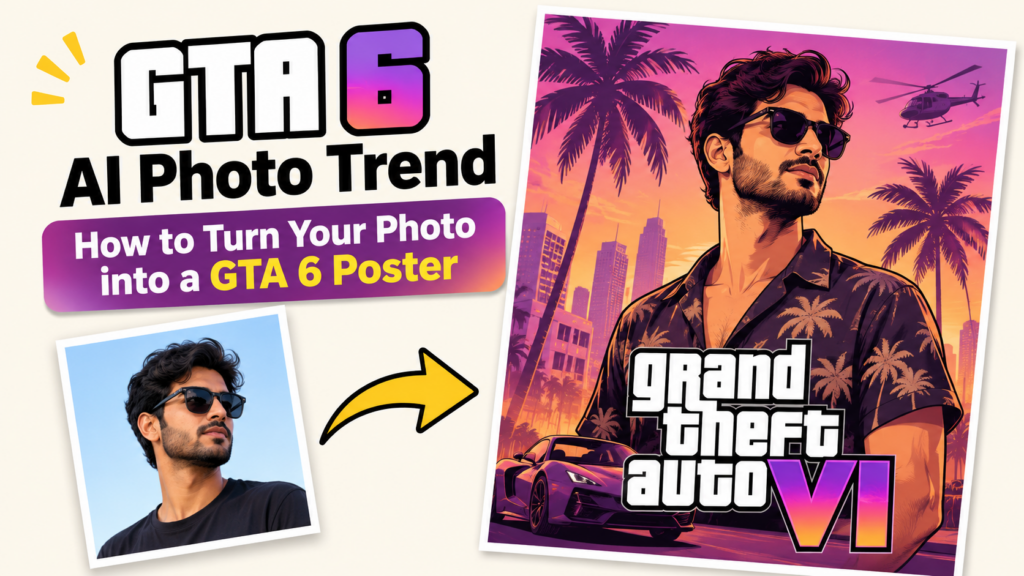
GTA 6 is finally here after 13 years. And now, social media is flooded with its poster images. New characters, new places. It’s a nostalgic game after all. But people are also creating GTA AI photos where they have replaced themselves or someone else. It basically looks like they are inside GTA in real time. Isn’t it so exciting?
So if you are looking forward to creating a GTA 6 AI photo, then you don’t have to look further. In this article, I am going to share how to create the GTA AI photo that’s going viral on social media and also give you prompts to do so. It is very simple to create these pictures, all you need is a good prompt and an AI photo generation tool.
What Is the GTA 6 AI Photo Trend?
GTA 6 AI Photo trend is a social media trend where people generate pictures using AI of the GTA poster in which they replace GTA characters with a picture of their own selves. It is just a fun trend.
GTA has a signature style that looks glamorous, hence attracting people to replicate it. AI changes the visual style, background, lighting, clothing details, and overall composition to fit into the GTA style.
Common elements of a GTA 6 AI Photo
If I show a normal video game poster and a GTA poster, you will probably be able to differentiate which one is the GTA poster. This is because it has a distinct style. But you might not be able to pinpoint exactly what sets it apart or why it looks so different. Here are some elements of a GTA poster that are also present in the GTA 6 AI Photos.
Illustrated characters
The photo elements are not unique to GTA 6. In every part, the vibe has always been more or less the same. So, your photo will be converted into an illustrated character.
Vice City-inspired backgrounds
The backgrounds are vice city inspired. Vice City is a fictional city where GTA takes place. It has palm trees, beaches, neon lights, and colorful city streets.
Cinematic colors
The colours are bright. Pink, orange, purple, and blue tones create a vibrant look.
Poster composition
The main character in the image appears in the centre and takes up most of the space. In the background, there is supporting scenery and dramatic lighting.
Game inspired atmosphere
The finished image resembles a promotional poster for an open-world crime game.
Best AI Tools to Turn Your Photo into a GTA 6 Poster
Any AI image generator can be used to generate the GTA 6 AI Photo. These are some of them:
ChatGPT
ChatGPT is used for most viral AI internet trends. It can create the GTA 6 AI Photo using prompts.
Google Gemini
Gemini is also beginner friendly, just like ChatGPT, and moreover, it’s free to use. It creates quick photo transformations.
Adobe Firefly
Adobe Firefly offers more detailed photo editing. After image generation, you can edit out some areas in the image.
Leonardo AI
Another popular image generator, Leonardo AI also gives its users more control over editing.
Canva
Canva is best for adding the poster text and giving finishing touches.
How to Turn Your Photo into a GTA 6 AI Photo Using ChatGPT
I am using ChatGPT as it is a convenient option.
Go to ChatGPT
Open a new conversation.
Upload your photo
Choose a picture that is high quality and low noise, with good lighting.
Enter Prompt
Enter a prompt that has all the information required for the transformation. Then click on generate andd the final image wil get ready.
GTA 6 AI Photo Prompt
You can directly copy this:
Transform my uploaded photograph into a vibrant, cinematic, Grand Theft Auto VI-inspired promotional poster. Preserve my facial identity, face shape, hairstyle, skin tone, and recognizable features. Show me as the main character standing confidently in a Vice City-inspired coastal city. Include palm trees, colorful Art Deco buildings, luxury sports cars, neon lights, and a beautiful pink-orange sunset. Use detailed digital painting, bold outlines, rich colors, dramatic shadows, and polished video game concept art. Create a professional vertical game poster composition. Do not distort my face. Do not add official game logos, existing characters, or watermarks.
Using ChatGPT to create the GTA AI photo
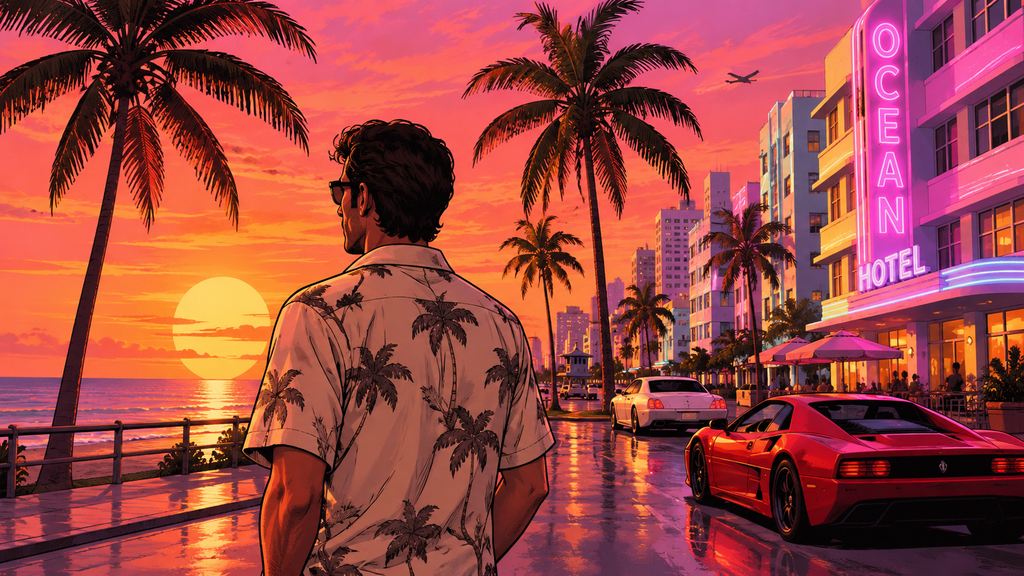
I am going to use ChatGPT to create the GTA AI photo. I will not use an image to transform, but rather create an image from scratch. Why I am using this prompt below:
Create an image of a man in a tropical coastal city with palm trees, a beautiful pink-orange sunset, luxury cars, and colorful buildings. Use vibrant painted textures, bold outlines, and cinematic lighting. Inspired by Vice City.
This is the result. Isn’t it amazing? It looks like the real poster for GTA.
FAQs
Can I create a GTA 6 AI photo using my own picture for free?
Yes. You can try AI image generators such as ChatGPT and Google Gemini to turn your picture into a GTA 6-inspired poster. Free usage limits may apply.
Which AI tool is best for creating a GTA 6 AI photo?
ChatGPT and Google Gemini are good options for beginners. Both let you upload a photo and use prompts to create GTA-inspired artwork.
What type of photo works best for a GTA 6 AI photo?
A clear portrait with good lighting and visible facial features works best. Avoid blurry or heavily filtered photographs.
Can I create a GTA 6 AI photo with two people?
Yes. Upload photographs of both people and ask the AI to combine them into one poster while preserving their facial features.
Can I share my GTA 6 AI photo on Instagram?
Yes. You can download your AI-generated artwork and share it on Instagram, WhatsApp, or other social platforms. Make sure you don’t present fan-made artwork as official Rockstar promotional material.
Conclusion
Creating a GTA 6 AI photo is an easy way to turn an ordinary picture into eye-catching video game-inspired artwork. Tools like ChatGPT and Google Gemini let you experiment with different backgrounds, outfits, colors, and poster styles without needing graphic design skills.
Start with a clear photograph, try the prompts shared in this guide, and make changes until you get the look you want. You can create anything from a colorful Vice City sunset portrait to a nighttime action poster using your own picture.

Sapna Ghodasara is the founder of Guide of AI Tool, where she writes in depth reviews of AI tools for marketers, creators and businesses. Her reviews focus on what matters before you pay for a tool: real use cases, honest pros and cons, pricing, and how well it fits into an everyday workflow.
Sapna is the cofounder of SEOMagicLab. That mix of technical training and daily marketing work lets her judge AI tools from two angles: how well the technology actually performs and whether it delivers real value for the people using it.

