
Microsoft Copilot

Write, summarize, search, and create with Microsoft Copilot.
What is Microsoft Copilot?
Microsoft Copilot is an AI companion built for Microsoft 365. It is created to help its users do their everyday tasks. Microsoft Copilot can be connected to your everyday apps. Some of them include Word, Excel, PowerPoint, Outlook, and Teams. Copilot can analyze data and use it for other tasks. It can also summarise meetings and compose documents.
Because it is connected to the Microsoft Graph, it can find data from your files, chats, calendar, and documents from across your entire organisation.
Features Of Microsoft Copilot
Microsoft 365 Integration
Works seamlessly with Word, Excel, PowerPoint, Outlook, and Teams.
Email and Document Summaries
Summarizes emails, documents, and meeting conversations.
AI Content Generation
From a prompt, generate content such as reports and emails
Excel Data Analysis
Helps analyze spreadsheets and suggests formulas or insights in Excel.
PowerPoint Presentation Builder
Builds PowerPoint presentations from documents or notes.
Natural Language Search
It searches emails, files, calendars, and chats using everyday language.
Meeting Notes & Action Items
Generates meeting notes and follow-up tasks after Teams calls.
AI Chat Assistant
Chat with AI Chat Assistant for everyday work questions.
Microsoft Graph Connectivity
Connects with Microsoft Graph to securely access business data.
Workflow Automation
Offers Copilot agents to automate repetitive workflows.
Use Cases Of Microsoft Copilot
Business Professionals
Write emails, make reports, and organize daily work.
Teachers
Create lesson plans, worksheets, and classroom materials.
Students
Take notes, summarize lessons, and finish school projects.
HR Teams
Write job posts, organize employee information, and prepare documents.
IT Teams
Find company files, write technical documents, and keep work organized.
What We Like About Microsoft Copilot
- Deep integration with Microsoft 365 makes it easy to use without switching between tools.
- Quickly finds information across Outlook, Teams, SharePoint, and OneDrive.
- Saves time by summarizing emails, meetings, and long documents.
- Makes everyday office tasks faster and more efficient.
- Simple interface that feels familiar to Microsoft users.
- Continues to add new AI features and workflow automation tools.
What We Don't Like About Microsoft Copilot
- The quality of research and complex reasoning isn't always as strong as some competing AI tools.
- Generated content often needs manual editing before it's ready to use.
- Features like presentation creation and coding assistance don't always deliver reliable results.
Microsoft Copilot Pricing Plans
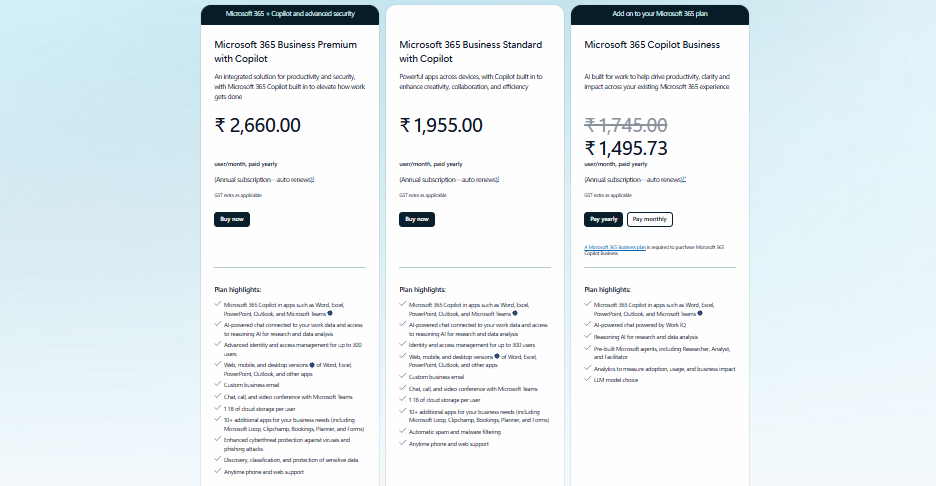
Microsoft 365 Business Premium
- Price: $31.50/user/month (paid yearly)
- Includes Microsoft 365 apps with Copilot
- Advanced security and identity protection
- Microsoft Teams and business email
- 1 TB OneDrive cloud storage
- Annual subscription with auto-renewal
Microsoft 365 Business Standard
- Price: $23.00/user/month (paid yearly)
- Microsoft 365 apps with Copilot
- Business email and Teams
- 1 TB OneDrive cloud storage
- Collaboration and productivity tools
- Annual subscription with auto-renewal
Microsoft 365 Copilot Business
- Price: $20.00/user/month (paid yearly)
- AI assistant for Microsoft 365 apps
- Works with Word, Excel, PowerPoint, Outlook, and Teams
- Requires an eligible Microsoft 365 plan
- Annual subscription with auto-renewal
FAQs About Microsoft Copilot
What is Microsoft Copilot?
Microsoft Copilot is an AI assistant that works with Microsoft 365 apps like Word, Excel, PowerPoint, Outlook, and Teams. It helps users write, summarize, search, and organize their work.
Is Microsoft Copilot free?
Microsoft offers both free and paid versions. Advanced features for business users are available with Microsoft 365 Copilot.
Can Microsoft Copilot create PowerPoint presentations?
Yes. It can turn documents or notes into PowerPoint slides and help improve existing presentations.
Does Microsoft Copilot work with Excel?
Yes. It can analyze data, suggest formulas, create charts, and help you understand spreadsheets more quickly.
Who should use Microsoft Copilot?
Microsoft Copilot is a good choice for students, teachers, office workers, managers, sales teams, and businesses that use Microsoft 365 every day.
Conclusion
Microsoft Copilot is for anyone using Microsoft 365 regularly and anyone writing content, getting information from their transcripts, and generating presentations. Although the results generated by the Copilot are not entirely reliable, for companies that mainly operate within Microsoft, the tool is a great addition, which allows for saving time and better organization in tasks. If most of your daily operations are part of the M365 environment, this is a good option for you.


