Have you ever spent 20 minutes designing what you think is a perfect Pin? But still, that pin got no saves or reach. Ultimately disappearing into Pinterest’s endless scroll.
It’s a canon event at this point. With more than 500 million Pinterest users on the platform planning everything from weeknight dinners to weddings, a Pinterest pin needs to do way more than just look pretty with a cute font pairing in order to garner those sweet clicks, saves, and re-saves.
But for that, you don’t need a design degree or to spend hours designing an image. A lot of AI tools are making some of the most stunning, high-converting Pins on Pinterest and can also generate Pinterest Design Ideas.
If you’re a blogger wanting more traffic to your site, a business owner creating a brand, or even just someone who’s trying to keep Pinterest boards organized, finding the perfect AI tool to help you design makes life easier. These seven tools will help you create beautiful Pins without any design experience.
How AI Tools Can Help Create Pinterest Design Ideas
AI tools actually make creating Pinterest design ideas much easier. You can plan a layout, generate many Pins at the same time, keep your branding consistent, and write copy that can be optimized.
Improve Pinterest SEO
AI can generate Pin headlines, descriptions, on-image text, and alternative text with the right keywords. That can help you create Pins that are easy to find through Pinterest searches.
Maintain your brand image
Some tools will analyze your blog or website to bring out the colors, fonts, imagery, and vibe. This can help you create consistent Pins in your style.
Create lots of Pins at once
AI tools can generate a variety of Pin styles from a single piece of content or post. That can save you tons of design time, compared to building each Pin manually.
Turn Ideas Into Designs
An AI design tool can take a reference image or screenshot and generate a design you can then tweak. This can be especially helpful if you have a vision but don’t know how to create it yourself.
Pinterest Design Ideas
Tools such as Tailwind SmartPin and Sivi AI can help you brainstorm Pin concepts, seasonal themes, angles, and visual approaches before you even get to designing.
AI Tools for Pinterest Design Ideas At A Glance
| Tool | Best For | Key Feature |
| Sivi AI | Pinterest design creation | Generates multiple visual designs from a single idea |
| Tailwind SmartPin | Fresh Pin creation | Creates new Pin designs from existing URLs |
| PinsMachine | Content-to-Pin creation | Turns content into Pinterest-ready Pins |
| Pintrio | Pin creation & scheduling | Combines Pin creation with Pinterest publishing |
| GenSumo | Pinterest automation | Automates parts of the Pinterest content workflow |
| Pinstark | Product Pins | Creates Pinterest visuals for products and promotions |
| Flick | Content & keyword research | Helps develop Pinterest content ideas and discover relevant keywords |
Best AI Tools for Creating Pinterest Content
Sivi AI

Sivi AI is an AI tool that can help create Pinterest design ideas and content. For images, it has templates that can be used to generate images and text at the same time. Canva has something similar, but Sivi AI has a specific AI mode that understands social media algorithms and makes the templates according to that.
Features
- Creates designs from simple text instructions
- Generates layouts, images, and text together
- Allows you to edit individual design elements
- Can create several versions of one design
Strengths
- Gives you more freedom to experiment with visual styles
- Useful when you don’t want to start with a template
- Works for Pinterest as well as other types of marketing graphics
Weaknesses
- Not designed specifically for Pinterest
- You may need to adjust designs for Pinterest’s preferred format
- Less useful if you mainly need Pinterest scheduling and publishing
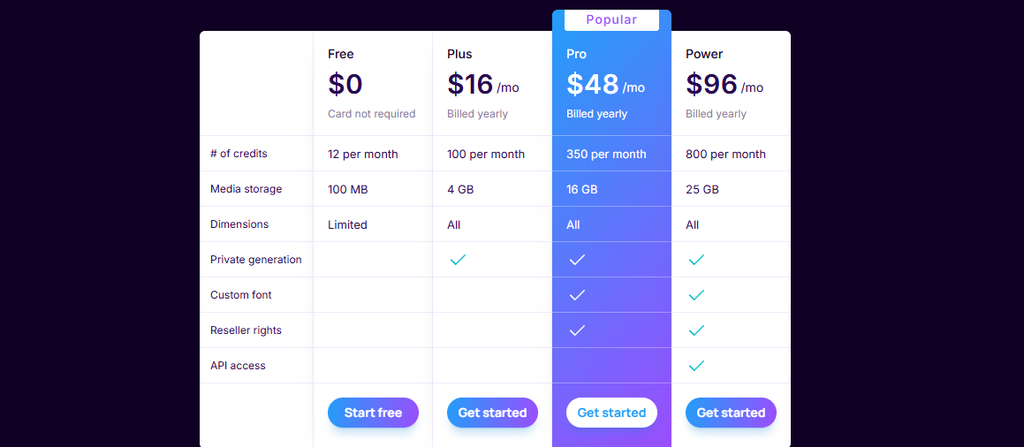
Pricing
Tailwind SmartPin
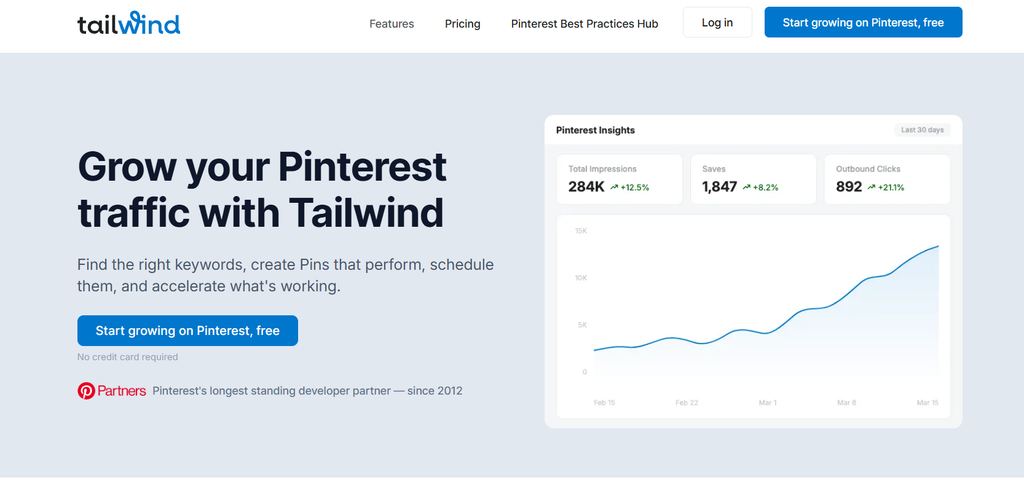
Tailwind SmartPin is part of the Tailwind app that is designed for growing Pinterest traffic by creating new pins altogether. Not only can you create pins, but also schedule them based on the timings you want. So basically, Tailwind gives you Pinterest design ideas and also helps with Pinterest marketing.
Features
- Creates fresh Pin designs from an existing URL
- Suggests Pin titles, descriptions, and keywords
- Can create different versions of the same content
- Connects creation with Pinterest scheduling
Strengths
- Great for keeping older blog posts active
- Reduces the work of making Pins one by one
- Useful for bloggers with a large content library
Weaknesses
- More useful for ongoing content than one-off design projects
- Some AI features depend on credits
- Design control is more limited than with a dedicated design platform
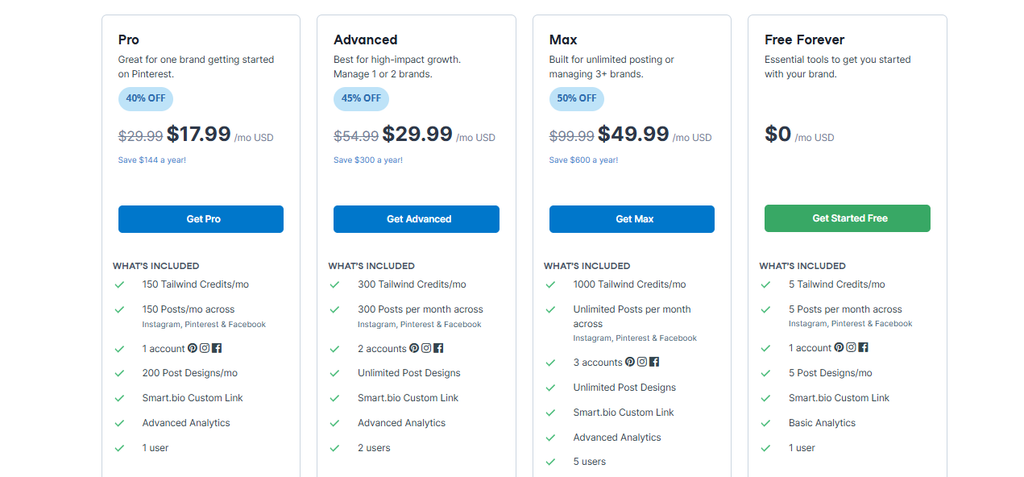
Pricing
PinsMachine
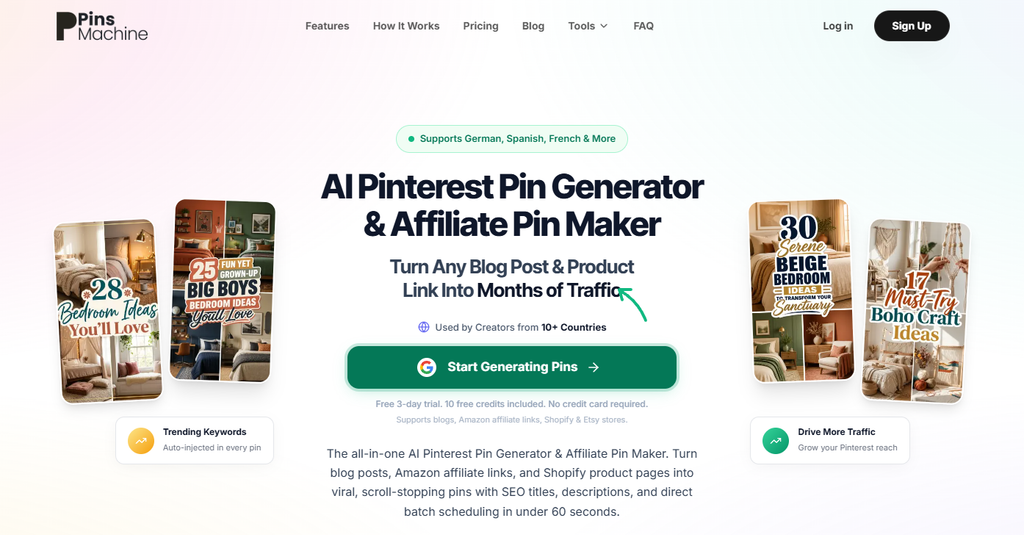
PinsMachine is an AI Pinterest tool that converts blog posts into pins. This is helpful for bloggers who want their blogs to get good reach, as Pinterest tends to have higher CTR compared to many other social media platforms. Just type the URL of the website it will find the keywords and create a Pinterest image with text.
Features
- Turns website and blog URLs into Pins
- Creates several Pin variations from one piece of content
- Generates images, headlines, and descriptions
- Supports bulk creation and scheduling
Strengths
- Good choice when you need a lot of Pins quickly
- Works well for websites with many articles
- Cuts down the amount of manual design and writing
Weaknesses
- The number of options can take some time to understand
- AI-generated designs may still need editing
- Better suited to high-volume users than occasional Pinterest users
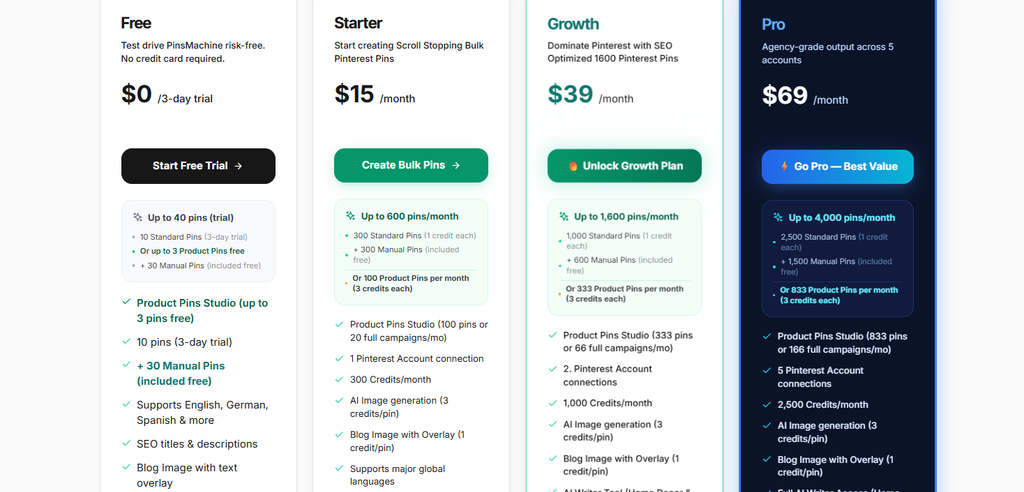
Pricing
Pintrio
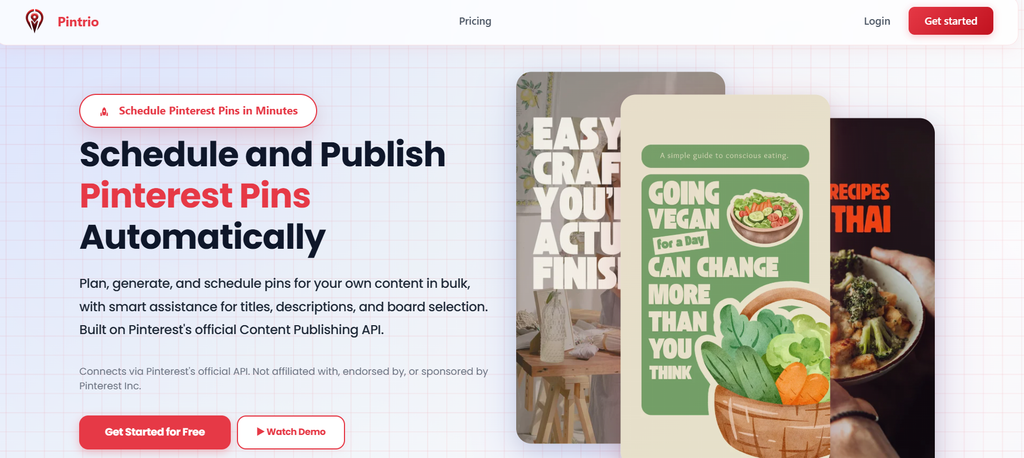
Pintrio is a Pinterest marketing tool that helps you come up with different Pinterest design ideas and provides templates for pin creation. It includes almost all the features that one requires for Pinterest marketing. However, it is mostly useful for those who need advanced features. Small businesses or individuals may not find it the most useful.
Features
- Creates Pins with AI
- Converts blog content into Pin designs
- Provides templates and design variations
- Includes scheduling and Pinterest management tools
Strengths
- Covers most of the Pinterest workflow in one platform
- Useful for managing several pieces of content
- Helps refresh existing Pins without starting from scratch
Weaknesses
- It can feel feature-heavy for beginners
- Less focused on advanced graphic design
- Users with simple Pinterest needs may not need all its tools
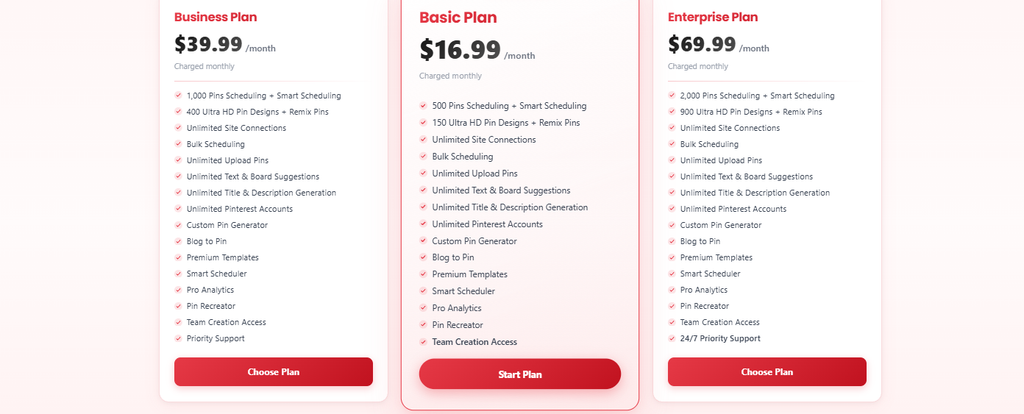
Pricing
GenSumo
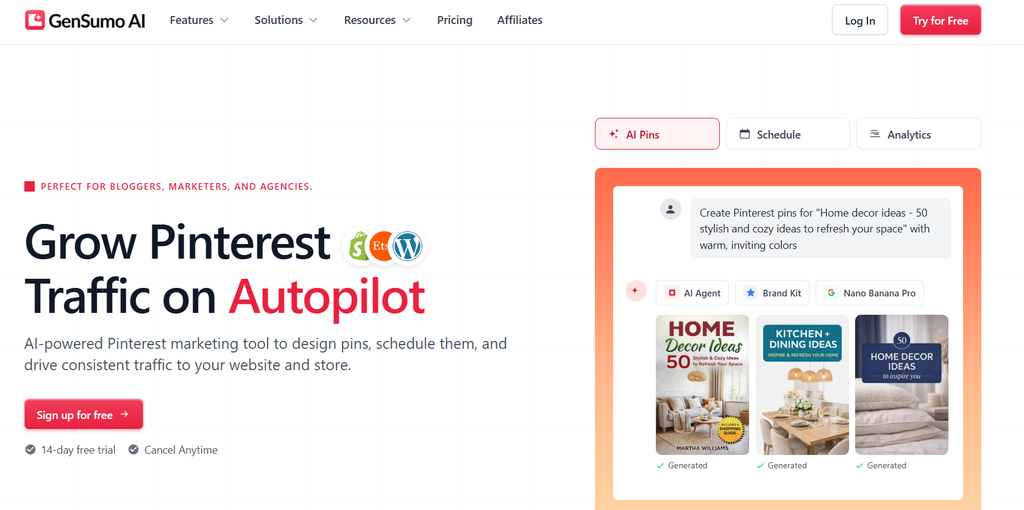
GenSumo generates Pinterest design ideas. You can create and manage Pinterest content in the same app. It decreases most of the manual work and makes Pinterest content creation much faster. It has an AI board generation feature that helps in organizing pins so that your boards don’t look like a hot mess.
Features
- Generates Pinterest content with AI
- Helps create Pin text and board ideas
- Includes scheduling and analytics
- Supports Pinterest account and website management
Strengths
- Built with Pinterest users in mind
- Combines content creation with automation
- Useful for users who want less manual Pinterest work
Weaknesses
- More suitable for regular Pinterest users
- The full set of features may be unnecessary for a small account
- Pricing can become a consideration for larger campaigns
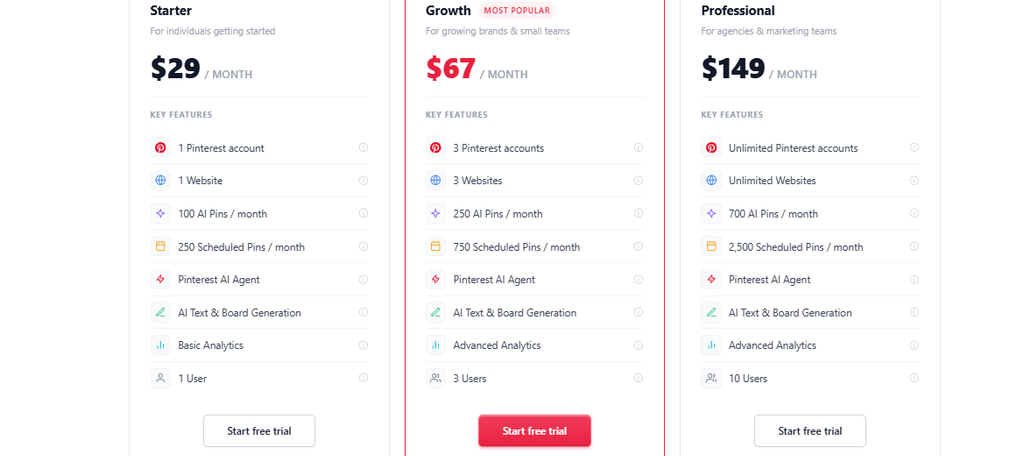
Pricing
Pinstark
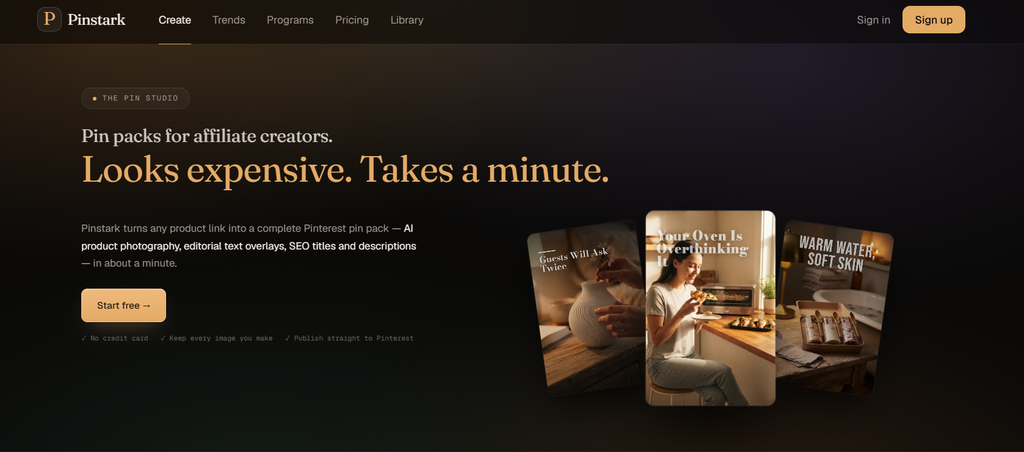
Pinstark is a Pinterest tool for affiliate creators to create product pins. It can generate multiple Pin titles and descriptions, so you can choose any of them. Not only that, it extracts product details from the provided URL
Features
- Creates Pins from product pages
- Generates different product visuals
- Writes Pin copy and suggests related boards
- Supports Pin editing and scheduling
Strengths
- A strong option for affiliate and product-based content
- Makes it easy to create several Pins around one product
- Saves time when promoting a large product catalog
Weaknesses
- Less useful for purely informational Pinterest accounts
- Its workflow is centered heavily around products
- High-volume campaigns can require more credits
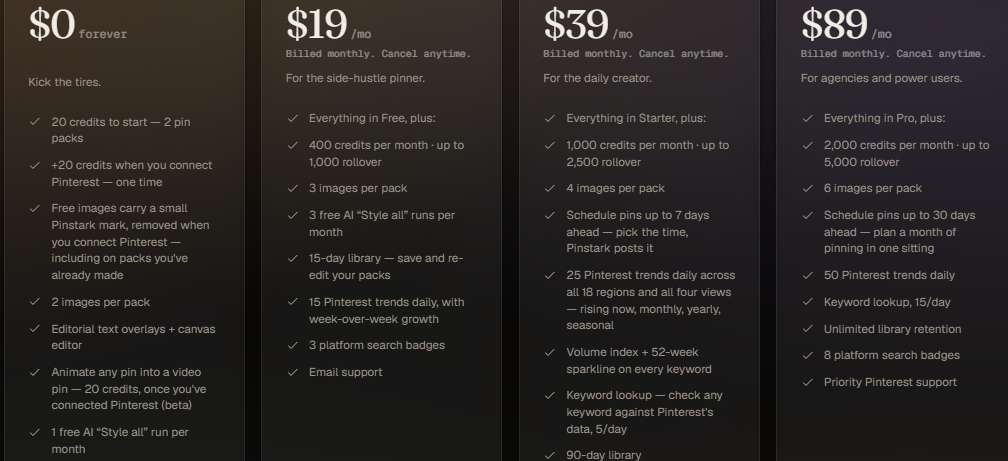
Pricing
Flick
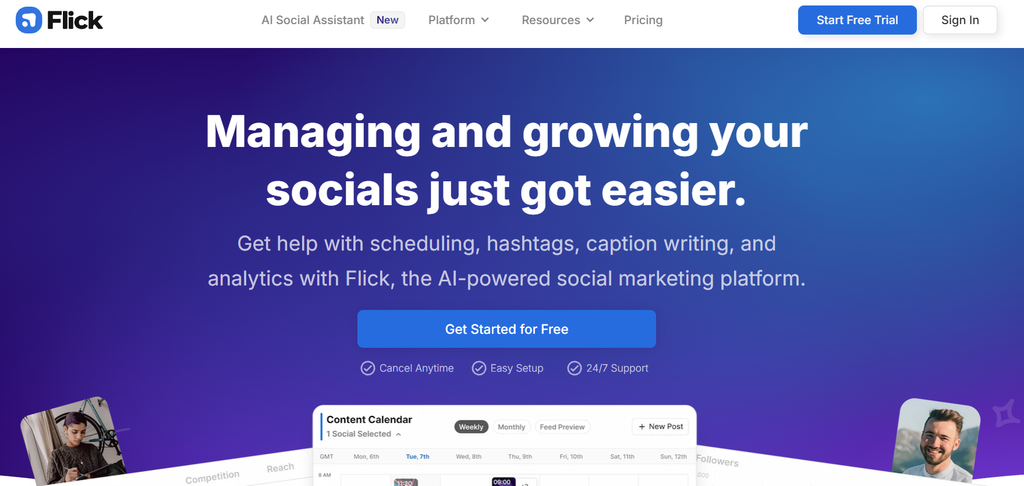
Flick is mainly a social media management tool. It is most beneficial for keyword and content research. You can do content scheduling not only for Pinterest but across many social platforms. Flick was originally planned to be a tool for finding hashtags. But now, it can do content planning, scheduling, analytics, AI writing, and so much more.
Features
- Helps brainstorm social media content
- Generates captions and content ideas
- Offers hashtag and keyword research
- Includes planning, scheduling, and analytics
Strengths
- Useful for coming up with new content angles
- Can support your wider social media strategy
- Helpful when you need ideas before creating the actual Pin
Weaknesses
- Pinterest isn’t its main focus
- More useful for content planning than Pin design
- Some features are geared toward other social platforms
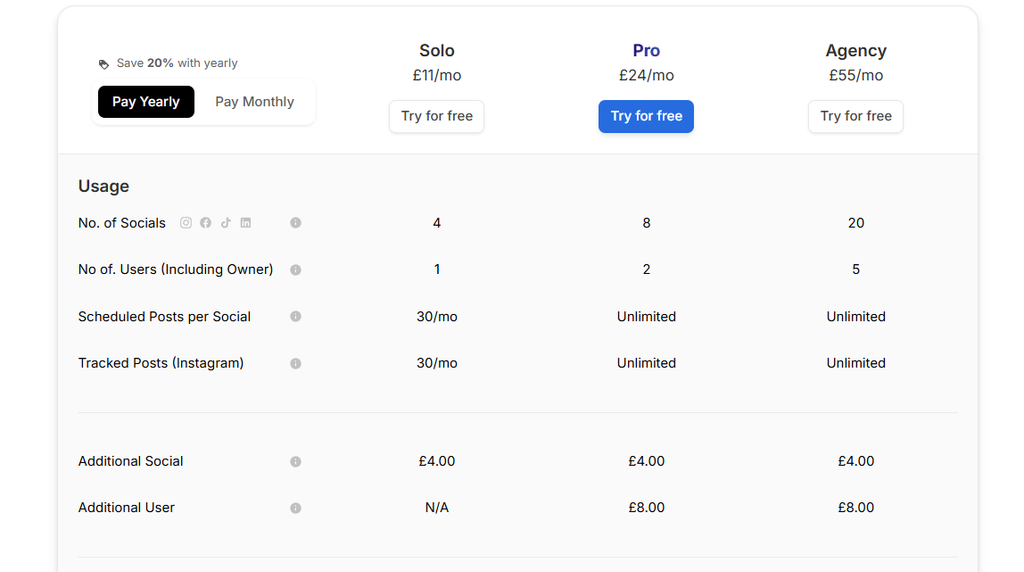
Pricing
FAQs
What are Pinterest design ideas?
Pinterest design ideas are visual concepts for creating attractive Pins, such as layouts, colors, text styles, and images.
How can AI tools help with Pinterest design?
AI tools can create Pin designs, suggest text and keywords, generate images, and produce multiple design variations quickly.
Do I need design skills to create Pinterest Pins?
No. Many AI Pinterest tools provide ready-made designs or generate Pins from simple prompts, URLs, or existing content.
What makes a Pinterest Pin attractive?
A clear headline, strong visual, easy-to-read text, and a design that matches the content can make a Pin more appealing.
Which AI tool is best for Pinterest design ideas?
It depends on the goal. Sivi AI is useful for visual design creation, while Tailwind SmartPin, PinsMachine, and Pintrio are better suited to Pinterest-focused workflows.

Sapna Ghodasara is the founder of Guide of AI Tool, where she writes in depth reviews of AI tools for marketers, creators and businesses. Her reviews focus on what matters before you pay for a tool: real use cases, honest pros and cons, pricing, and how well it fits into an everyday workflow.
Sapna is the cofounder of SEOMagicLab. That mix of technical training and daily marketing work lets her judge AI tools from two angles: how well the technology actually performs and whether it delivers real value for the people using it.