Hemingway App
Improve readability, clarity, and flow with simple writing tips.
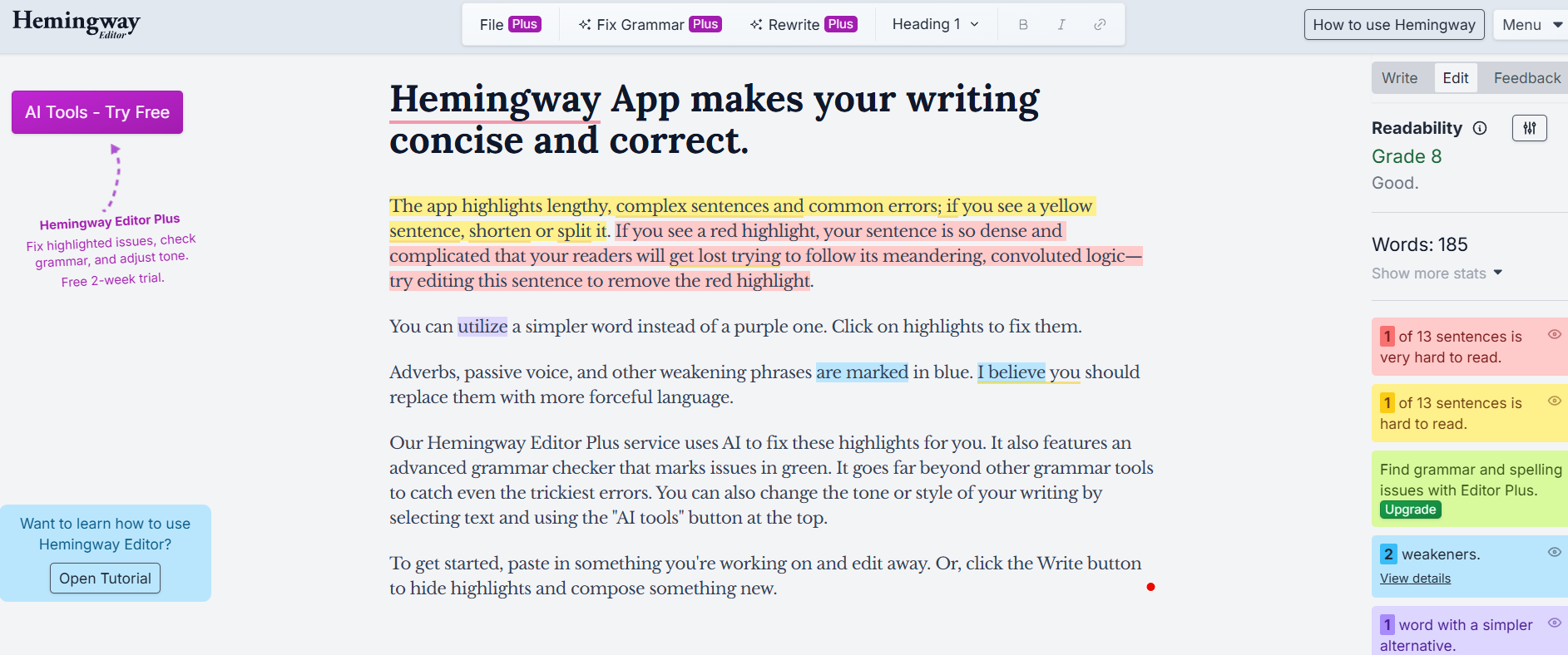
The Hemingway App is an AI writing assistant geared towards clear and straightforward writing. It analyzes your text and highlights sentences that are too long, words that are too difficult, heavy use of passive voice, overuse of adverbs, etc. On top of that, it gives a readability score to indicate the ease level of your content for readers.
The Hemingway App simplifies editing to an instant and easy task with sensible advice and color-coded highlighting. It gives writers the opportunity to concentrate on clarity, flow, and the use of effective communication.
Features Of Hemingway App
Easy-to-Use Interface
The Hemingway app layout is neat and simple. Just paste your text and start editing right away.
Color-Coded Writing Feedback
The app uses colors to show problems in your writing. Yellow shows hard-to-read sentences. Red shows very hard-to-read sentences. Blue marks adverbs while Green highlights passive voice.
Readability Score
Hemingway gives your writing a grade level score. This tells you how easy your content is to read for most people.
Sentence Improvement Suggestions
The app highlights long or complex sentences and suggests simpler ways to write them.
Adverb and Passive Voice Detection
It points out extra adverbs and passive voice so your writing becomes stronger and more active.
Word Count and Reading Time
You can see how many words you’ve written and how long it will take someone to read your content.
Basic Formatting Tools
Hemingway allows basic formatting like bold text, italics, and headings.
Direct Publishing
You can publish your writing directly to platforms like WordPress and Medium.
Use Cases Of Hemingway App
Students
Students may use Hemingway to simplify their essays and make them more understandable.
Bloggers
Bloggers may use it to write easily understandable and captivating posts that encourage readers to continue reading.
Content Creators
It is a great tool for content writers who want to produce simple and readable pieces for websites and social media.
Business Professionals
Professionals use it to write clear emails, reports, and proposals.
Editors and Writers
Editors use Hemingway to spot weak sentences and improve flow quickly.
How To Use Hemingway App
- Open the Hemingway App website or desktop app
- Paste your text into the editor
- Look at the color highlights
- Fix long sentences, passive voice, and extra adverbs
- Check the readability score
- Edit until your writing is clear and simple
- Export or publish your content
What We Like About Hemingway App
Simplicity
The app is easy to understand and use.
Visibility
Problems are easy to spot with colors.
Readability
Helps make writing clear and simple.
Strength
Pushes writers to use better words.
Accessibility
Perfect for new writers and students.
Convenience
You can start using it right away.
What We Don't Like About Hemingway App
Creativity
Can limit writing style and flow.
Grammar
Does not catch all grammar mistakes.
Oversimplification
May remove important details.
Dependence
Works better when used with other tools.
Hemingway App Pricing Plans
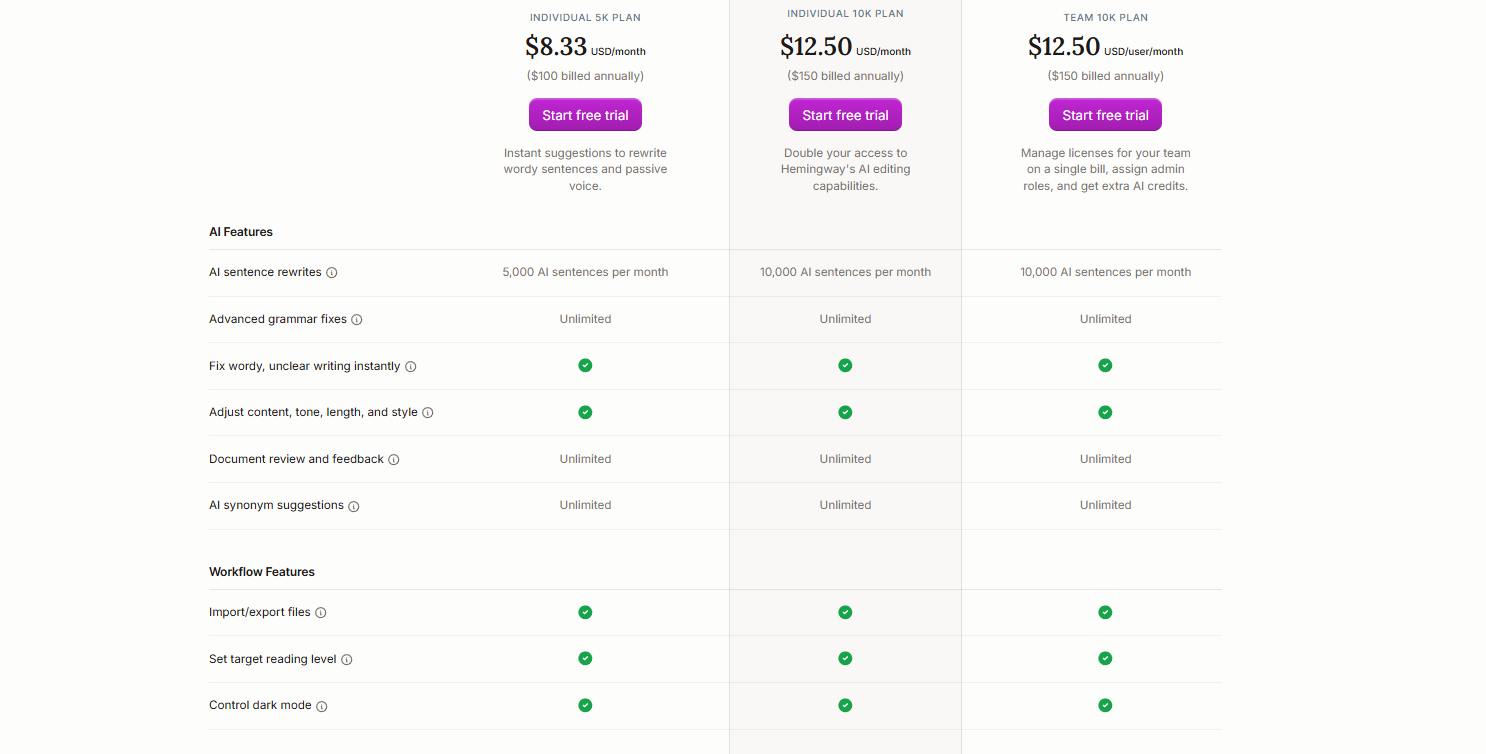
Individual 5K Plan - $8.33 per month
- Best for: Solo writers and students
- 5,000 AI sentence rewrites per month
- Unlimited grammar fixes
- Fixes wordy and unclear writing
- Adjusts tone, length, and style
- Unlimited document feedback
- Unlimited synonym suggestions
- Import and export files
- Set reading level and use dark mode
Individual 10K Plan - $12.50 per month
- Best for: Bloggers and frequent writers
- 10,000 AI sentence rewrites per month
- Unlimited grammar fixes
- Strong readability improvements
- Tone, style, and length controls
- Unlimited document feedback
- Unlimited synonym suggestions
- Import/export and reading level control
- Dark mode support
Team 10K Plan - $12.50 per user per month
- Best for: Teams and businesses
- 10,000 AI sentence rewrites per user
- Team license management
- Admin role controls
- Extra AI credits
- Unlimited grammar and writing feedback
- All workflow and readability tools
FAQs About Hemingway App
Is Hemingway App free?
Yes, the web version is free to use.
Does Hemingway fix grammar mistakes?
It fixes readability issues but not advanced grammar errors.
Is Hemingway good for students?
Yes, it helps students write clear and simple content.
Can I use Hemingway offline?
Yes, with the paid desktop version.
Is Hemingway better than Grammarly?
Hemingway focuses on readability, while Grammarly focuses on grammar.
Conclusion
Hemingway App is a very effective tool for making the your writing very clear and readable. Writers can rely on it to make simple sentences, eliminate the passive voice, and work on continuity. Although it might not be the best tool for creative writing purposes, it is highly suitable for students, bloggers, and different professionals.