Canva
Simplify content creation with templates, AI, and collaboration
AI-generated content has become a major contributor to modern design workflows. It helps artists and designers to create images, videos, and graphics at a much faster pace than before. Canva has adopted this change and offers two great AI tools: Magic Media and Dream Lab.
They both strive to make content creation easier; however, their functions differ a bit. Magic Media is mainly about making images and videos based on text descriptions, whereas Dream Lab is aimed at producing complex AI-generated art and visuals.
In this review, we'll take a closer look at both tools, their features, use cases, pricing, and overall value for creators and businesses.
Overview of Magic Media and Dream Lab
Magic Media and Dream Lab are Canva's AI-powered content generation tools that allow users to create visuals simply by describing what they want.
Magic Media is designed for quick content creation, enabling users to generate images, graphics, and short videos directly within Canva.
Dream Lab is Canva's dedicated AI image generation workspace that provides greater creative control and helps users produce more detailed, artistic, and customized visuals.
Features Of Canva
AI Image Generation
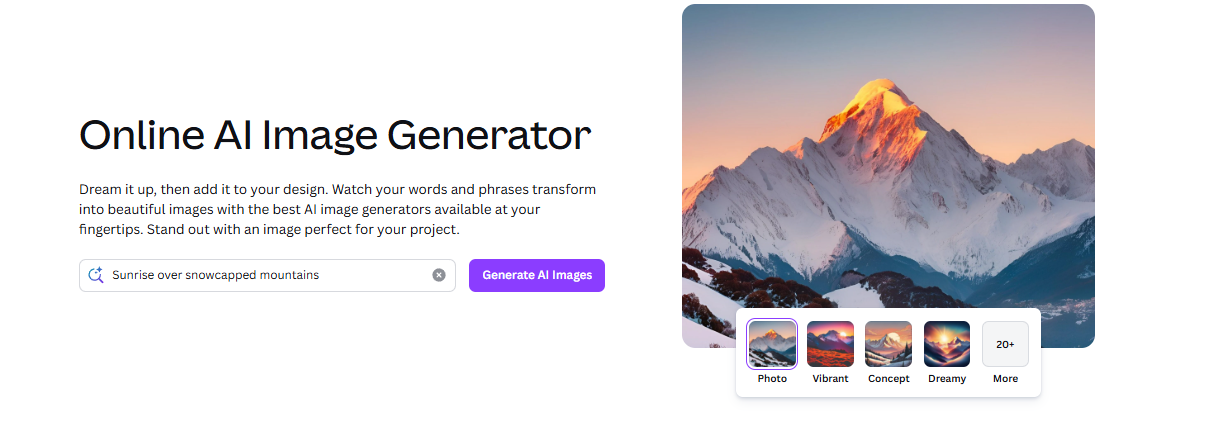
Magic Media and Dream Lab work in similar ways to convert texts into totally new images or pictures within seconds.
AI Video Creation
Magic Media almost equips users to make a motion video clip out of a text description.
Multiple Art Styles
The creators are able to produce images in real, pictorial, cinematic, and drawn modes.
Canva Integration
Once content is generated, it can be easily modified by using Canva's templates, different design elements, and editing features.
Fast Content Creation
Producing visuals from your own imagination, completely custom made, without having to resort to stock images or spending a long time on designing.
Creative Exploration
You can brainstorm with your ideas and moods and designs before you finally settle on a single one.
User-Friendly Interface
Even non-designers or inexperienced ones are able to use these tools very well.
Use Cases Of Canva
Social Media Content
Produce images for Instagram, Facebook, and LinkedIn
Marketing Campaigns
Design striking visuals to enhance ads and emails.
Presentations
Make a presentation by designing various customized visuals and illustrations.
Blog and Website Graphics
Create relevant and attractive images for blogs.
Creative Projects
Imagine and visualize your ideas by creating concept drawings, mood boards, and other creative materials for personal or business use.
Educational Content
Visualize concepts and make learning fun and easy by designing infographics, visual aids and other educational materials.
How To Use Canva
Step 1: Sign In to Canva
Log in to your Canva account and create a new design project.
Step 2: Access Magic Media or Dream Lab
Open Canva's AI tools section and choose the tool that best fits your project.
Step 3: Enter a Prompt
Describe the image or video you want the AI to generate.
Step 4: Generate Content
Allow Canva to create visual options based on your prompt.
Step 5: Customize the Results
Edit the generated content using Canva's built-in design tools.
Step 6: Download or Publish
Export your design or publish it directly through Canva.
What We Like About Canva
- Easy for beginners to use.
- Fast AI-powered content generation.
- Integrated into Canva's design ecosystem..
- Supports both image and video creation.
- Wide variety of creative styles.
- Saves time on content production.
- Useful for personal and professional projects.
- No advanced design skills required.
What We Don't Like About Canva
- Results depend heavily on prompt quality.
- Some AI-generated visuals require additional editing
- AI-generated videos are still relatively basic compared to dedicated video tools.
Canva Pricing Plans
Free Plan
- Basic design tools and templates
- Limited AI usage
- 5 GB cloud storage
- Access to Canva's core design features
Canva Pro - $48/year per user
- Premium templates and stock assets
- Background remover and advanced editing tools
- Social media scheduling
- Brand Kit features
- 100 GB cloud storage
- Increased AI usage limits
Canva Business - $82/year per user
- Everything is included in Pro
- Team collaboration and admin tools
- Brand approval workflows
- Advanced AI capabilities
- 500 GB cloud storage
- Enhanced team management features
Canva Enterprise - Custom pricing
- Enterprise-grade security and compliance
- Single Sign-On (SSO)
- Custom apps and integrations
- Dedicated customer support
- 1 TB cloud storage
- Advanced brand and team management tools
FAQs About Canva
Are Magic Media and Dream Lab free to use?
Yes, but free users have limited AI credits.
What is the difference between Magic Media and Dream Lab?
Magic Media creates images and videos, while Dream Lab focuses on advanced image generation.
Do I need design experience to use these tools?
No, both tools are beginner-friendly.
Can I edit AI-generated content?
Yes, generated content can be customized in Canva.
Are these tools suitable for professional projects?
Yes, though some outputs may need minor refinements.
Conclusion
Magic Media and Dream Lab show how Canva makes AI design simple for everyone. These tools can quickly create marketing images, social media posts, presentation graphics, and creative artwork. They help turn ideas into finished designs with just a few clicks.