Photoroom
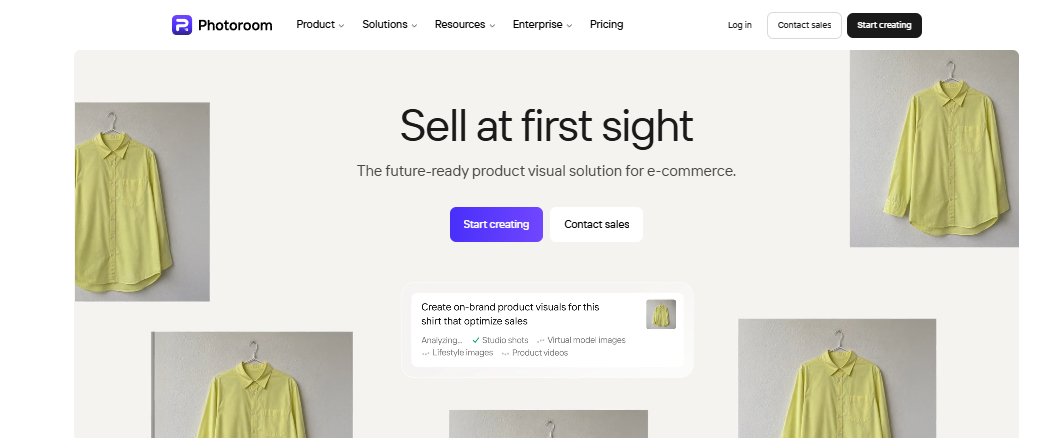
AI photo editor for professional product images
What is Photoroom?
Photoroom is an AI tool for product photography. It offers tools for background removal, AI product staging, image enhancement, and product photography, making it especially useful for eCommerce sellers, marketers, and content creators.
Photoroom was founded in 2019 by Matt and Eliot Andres after Matt experienced the challenges of manually editing product images. They created the platform to make professional photo editing faster and easier using AI.
Key Features Of Photoroom
Photoroom provides many different features that can help you create better product photography:
AI Product Staging
Produce realistic product images with the AI generating both backgrounds and objects to save costs by avoiding pricey studio sets.
AI Fashion Models
Have your product pictures turned into eye-catching flat lay styles and arrangements perfect for catalogs, social media and marketplaces.
Ghost Mannequin
Instantly create invisible mannequin effects that give apparel a clean, three-dimensional appearance commonly used in eCommerce.
Flat Lay Creator
Convert product images into attractive flat lay compositions that are ideal for catalogs, social media, and online marketplaces.
Product Beautifier
Automatically enhance product photos with optimized lighting, color, sharpening, and image quality for a polished image.
Clothing Wrinkle Removal
Remove wrinkles and creases from garments digitally, creating smooth, professional-looking clothing images in seconds.
AI Shadow Generator
Add realistic natural or studio-style shadows to product images, making them appear more professional and visually appealing.
AI Image Editor
Edit product images with AI-powered tools, including background changes, object removal, lighting adjustments, and more.
White Background
Replace any background with a clean white one that meets the image requirements of major eCommerce platforms.
Background Blur
Make amazing and relevant images matching your brand or product type in just a few steps.
AI Background Generator
Generate custom AI backgrounds that match your brand, product style, or marketing campaign with just a few clicks.
Background Remover
Erase the background completely and make clean product images for any platform with the highest precision at your fingertips.
AI Product Video Generator
Create videos to market your products effectively across social networks, advertising campaigns, and online shops.
Object Remover
Remove any of the objects, people, or reflections that you do not wish to display with natural results.
Clothing Recoloring
Change the color of garments digitally to showcase multiple product variants without conducting additional photoshoots.
Image Resizer
Resize images for websites, online marketplaces, advertisements, or social media while maintaining image quality.
Transparent Background Creator
Export product images with transparent backgrounds, making them easy to place on websites, graphics, or marketing materials.
Use Cases Of Photoroom
Photoroom is used across innumerable industries by proficient individuals.
Food & Delivery
Make food photography that looks mouth watering, remove backgrounds, and get appealing promotional photos to promote food delivery apps.
Fashion & Apparel
Market your clothes using AI fashion models, get the ghost mannequin effects as well as design product lists, all without photo shoots.
Marketplaces
Prepare high-quality product images for platforms like Amazon, Etsy, eBay, and Shopify by removing backgrounds, resizing images, and enhancing product photos.
Home & Furniture
Visualize all your furniture and home décor products to enhance home photos.
Beauty
Produce clean, premium-looking images for skincare, cosmetics, and personal care products with AI backgrounds, shadow effects, and professional photo enhancements.
Automotive
Enhance vehicle and auto accessory photos by removing unwanted objects and replacing backgrounds.
The best things about Photoroom
Easy to Use
The interface is clean and beginner-friendly, allowing anyone to create professional-looking images without prior editing experience.
Excellent Background Removal
Photoroom accurately removes backgrounds in seconds, making it ideal for product photography and eCommerce listings.
Powerful AI Editing Tools
It offers a wide range of AI features, including product staging, shadow generation, object removal, and image enhancement.
Great for eCommerce
The platform helps businesses create high-quality product photos that are optimized for online stores and marketplaces.
Batch Editing
Users can edit multiple images at once, making it easy to manage large product catalogs efficiently.
High-Quality Templates
Photoroom includes professionally designed templates for product promotions, advertisements, and social media posts.
Things about Photoroom that need to improve
Limited Free Version
Free users face restrictions on image exports, premium templates, and advanced editing capabilities.
Desktop Experience Could Be Better
Certain features and workflows are more polished on the mobile app than on the desktop version.
Complex Images Can Be Challenging
Photos with intricate details, reflections, or overlapping objects may not always produce perfect AI edits.
Photoroom Pricing Plans
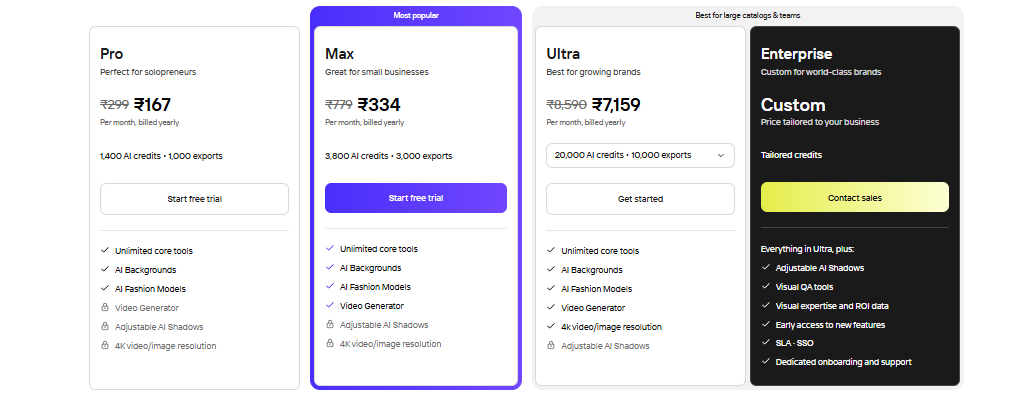
Pro Plan – Approx. $1.90/month
- 1,400 AI credits
- 1,000 exports
- Unlimited core tools
- AI Backgrounds
- AI Fashion Models
- Video Generator
- 7-day free trial
Max Plan – Approx. $3.85/month
- 3,800 AI credits
- 3,000 exports
- Unlimited core tools
- AI Backgrounds
- AI Fashion Models
- Video Generator
- 7-day free trial
Ultra Plan – Approx. $82.30/month
- 20,000 AI credits
- 10,000 exports
- Unlimited core tools
- AI Backgrounds
- AI Fashion Models
- Video Generator
- 4K video and image resolution
- Adjustable AI Shadows
Enterprise Plan – Custom Pricing
- Custom AI credits
- Everything included in the Ultra plan
- Adjustable AI Shadows
- Visual AI tools
- ROI analytics and reporting
- Early access to new features
- SLA and Single Sign-On (SSO)
- Dedicated onboarding and customer support
FAQs About Photoroom
How much does the Photoroom app cost per month?
Photoroom offers a free plan, while paid plans start at around $1.90/month (billed annually). Higher-tier plans provide more AI credits and features.
Is Photoroom safe?
Yes. Photoroom is generally safe to use and follows standard security and privacy practices for handling user data.
Is Photoroom free?
Yes. Photoroom has a free plan with basic editing tools, while advanced AI features require a paid subscription.
Which is better, Canva or Photoroom?
Photoroom is better for product photography and background removal, while Canva is better for graphic design and marketing content.
Conclusion
Photoroom has been modified into a complete AI product photography solution. Businesses can generate professional, marketplace ready images in a very short amount of time. Its AI Product Staging, fashion models, and automated editing features make it highly effective for eCommerce brands, resellers, and content creators needing to generate images at scale.