Y2K aesthetic spans from the late 90s to the mid-2000s, and Y2K digicam photos are basically pictures that show the flashy colours, grainy textures, and overall aesthetic of that era.
It is quite hard to replicate the same essence with modern smartphone cameras. Although modern cameras may have the best quality, they cannot capture the details of Y2K digicam photos.
If you are eager to find a way to see how you would look in Y2K digicam pictures, then you can take the help of AI.
In this article, I am going to discuss how to create the perfect Y2K Digicam picture with only the help of AI.
What are Y2K Digicam Photos?
Y2K digicam photos are pictures influenced by the compact digital cameras that were popular during the late 1990s and early 2000s. These types of cameras were used to click pictures during gatherings and parties.
Modern smartphone photos are too polished and perfect, but back in that era, photos had visible noise in them, making them look grainy, and sometimes they had slightly washed out colours. A bright flash was used to click pictures.
The modern resurgence of the Y2K aesthetic started during the lockdown in 2020, and since then, the popularity has just kept rising.
Features of Y2K Digicam Photos
Before using AI for creating these pictures, you should be aware of the type of features they had, so you compare the results and can choose the image that is most identical with the Y2K aesthetic.
Harsh flash
Since those pictures were mostly taken indoors without natural light, they needed hard flash on the subject.
Grain and noise
The pictures are anything but polished. The small imperfections make the pictures look not so perfect.
Soft focus
The pictures have a very slight blur, so the images have minimal sharpness.
Early-2000s colors
The early 2000s had a very distinct sense of style. Cool tones and oversaturated colours were more popular.
Casual composition
Candid poses, close-up portraits, and imperfect framing.
Date stamps
Date stamps in pictures were actually made popular with Huji, as well as capturing the essence of the late 90s film camera. But yes, date stamps are needed for the Y2K digital cam picture.
How to Create Y2K Digicam Photos With AI
There are two options: either create an entirely new picture or use an existing image. For both, you need good prompts.
Step 1: Choose an AI Image Tool
The best option is to use ChatGPT; if you go to ChatGPT Images, you can find Y2K Digicam in the trending section. But you can go to any AI image generator. Just see if that tool has prompt-based editing.
Step 2: Upload a Photo or Describe It
If the face has to be recognizable, then upload a very clear picture. For better results, select an image with a plain background. If the photo is taken indoors, then it’s even better.
If you do not have a relevant photo, then you can generate an image from scratch.
Step 3: Write a Y2K Digicam Prompt
For most image generations, the prompt has a big impact. Mention the details that make early digital photography recognizable
Focus on the features that I have mentioned before, like direct flash, compact camera quality, grain, slightly imperfect focus, and casual framing.
For example:
Prompt:
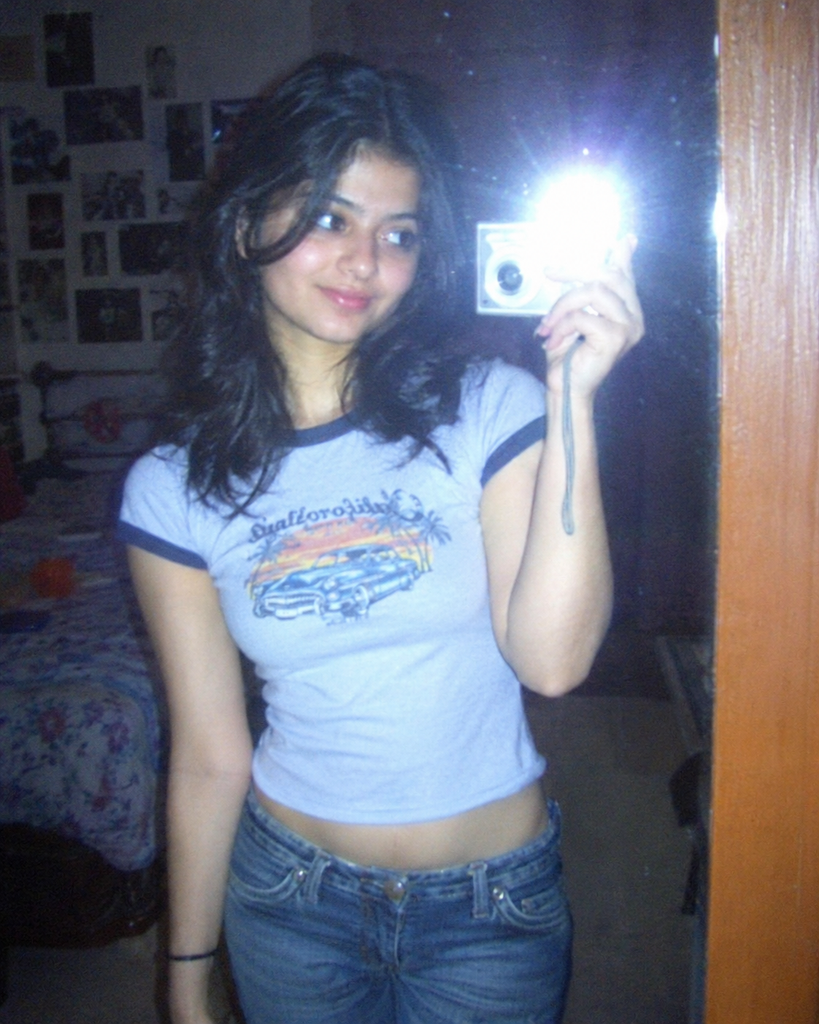
Create a realistic early-2000s digital camera photo taken in 2003 with a compact point-and-shoot digicam. A young woman casually posing in front of a bedroom mirror, wearing a vintage graphic baby tee and low-rise jeans, with a relaxed, slightly awkward pose. Direct on-camera flash, bright highlights on the face, deep shadows in the background, subtle digital noise, slightly soft focus, imperfect white balance, mildly oversaturated colors, and low-resolution digital texture. Authentic candid snapshot, spontaneous composition, nostalgic Y2K fashion aesthetic, realistic skin texture, natural facial features, unedited amateur photography. Make it look like a real photo from an old digital camera, not a modern professional photoshoot, not film photography, not cinematic, not overly polished. Vertical 4:5 composition.
This is the result:
Step 5: Add Optional Digicam Details
Small details can make your image feel more authentic. You might add a date stamp, a slightly blurred background, or the appearance of a low-resolution flash photograph.
Step 6: Review and Save Your Image
Before saving, check whether the image still looks like the person or scene you intended to recreate.
FAQs
How do I create Y2K digicam photos with AI?
Use an AI image generator and describe early-2000s camera effects.
Can I create Y2K photos without uploading an image?
Yes. Write a detailed prompt describing the person, outfit, setting, lighting, and digicam aesthetic.
How do I make AI photos look like real digicam pictures?
Use direct flash, subtle digital noise, slightly soft details, and casual framing. Avoid overly polished lighting and heavy vintage filters.
Can I create Y2K digicam photos for free?
Yes. Some AI image generators and photo editors offer free plans or limited credits, depending on the tool.
Conclusion
Creating Y2K digicam photos with AI is easy when you use the right prompts. Describe the setting, outfit, direct flash, digital noise, and slightly blurry details to recreate the early-2000s look. Experiment with different scenes and adjust the effects until your photos feel like real vintage digital snapshots.

Sapna Ghodasara is the founder of Guide of AI Tool, where she writes in depth reviews of AI tools for marketers, creators and businesses. Her reviews focus on what matters before you pay for a tool: real use cases, honest pros and cons, pricing, and how well it fits into an everyday workflow.
Sapna is the cofounder of SEOMagicLab. That mix of technical training and daily marketing work lets her judge AI tools from two angles: how well the technology actually performs and whether it delivers real value for the people using it.