A receipt scanner may not seem like an essential for a small business until you realise how vulnerable paper receipts can make your business. Using the vendor and date, anyone can pull out confidential information about your business. Digitalizing paper receipts is a good option. The main technology behind online receipt scanners is Optical Character Recognition (OCR).
You can probably already have heard this term called ‘OCR’ somewhere.OCR is basically a technology that extracts information from a picture or document. This technology is used mostly in logistics and retail, banking, finance, and in healthcare as well. Basically, any industry that requires scanned text from images.
A good receipt scanner for a small business should be affordable and coordinated with the overall financial operations of a business. This is why many financial and accounting tools have integrated receipt scanners within their systems.
Some of them are dedicated receipt scanners only. So, without wasting time, let’s explore the 6 Best tools for receipt scanning and compare their features and pricing.
What is a Receipt Scanner?
A receipt scanner, in simple words, is basically software that scans an image and extracts vital information that a business would require. A receipt scanner can have AI features but may also require some verification, like Shoeboxed.
Receipt Scanning Tools at a Glance
| Tool | Best For | Key Features |
| SparkReceipt | AI receipt tracking | Receipt scanning, bank matching, expense reports |
| FreshBooks | Small business accounting | Receipt scanning, invoicing, expense tracking |
| Smart Receipts | Expense reporting | Receipt scanning, mileage tracking, PDF/CSV reports |
| Foreceipt | Automated receipt management | AI extraction, receipt organization, expense tracking |
| Shoeboxed | Receipt digitization | Receipt scanning, data extraction, tax-ready reports |
| Veryfi | Automated expense management | OCR, expense categorization, bookkeeping automation |
SparkReceipt
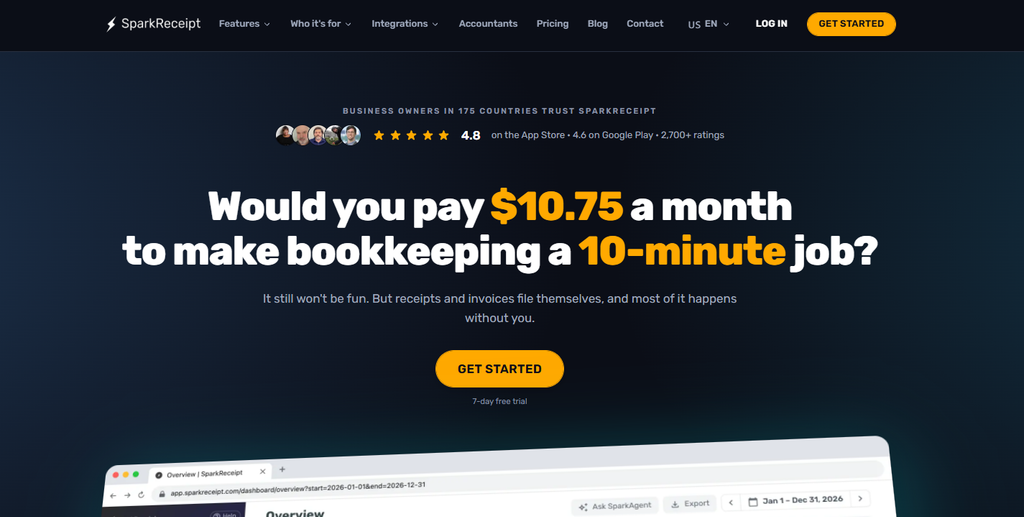
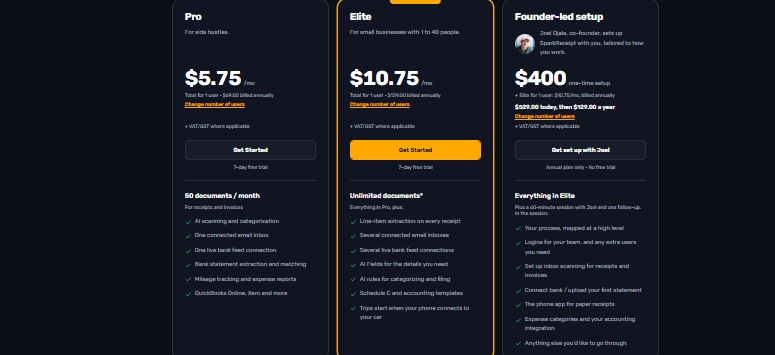
SparkReceipt is quite no nonsense about what it does. Its tagline is ‘Would you pay $10.75 a month to make bookkeeping a 10 minute job?’ The idea behind this receipt and expense management tool is simple. It scans the receipts, extracts information such as the transaction details, and generates expense reports. So, we can say that it is a all in one platform.
In situations which you have gotten an invoice through an email and want it to be scanned right away, SparkReceipt can a solution for that too, it can import email receipts from email web email services like gmail, microsoft outlook.
There is an AI assistant called Sparkagent that supports integrations with Xero, Zoho Books, FreshBooks, and Sage Accounting. SparkReceipt is best suited for small businesses in different industries like construction, real estate, and healthcare.
Features
- AI receipt scanning and data extraction
- Bank transaction matching
- Expense reports and mileage tracking
Strengths
- Accurate AI receipt extraction
- Convenient email imports and automatic categorization
- Accountant sharing and responsive support
Weaknesses
- Occasional receipt date extraction errors
- Mileage reporting limitations
- Limited accounting integrations and PDF customization
Pricing
Freshbooks
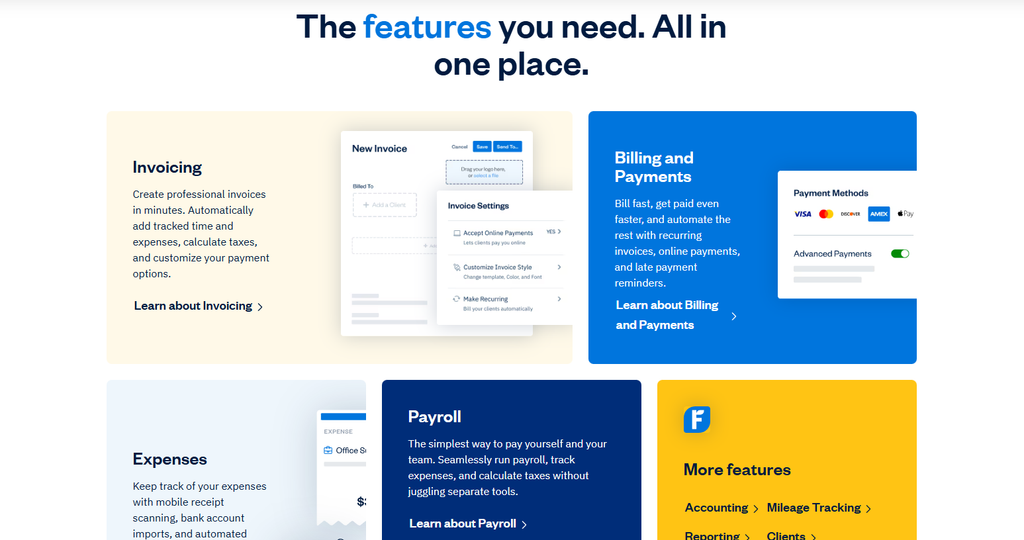
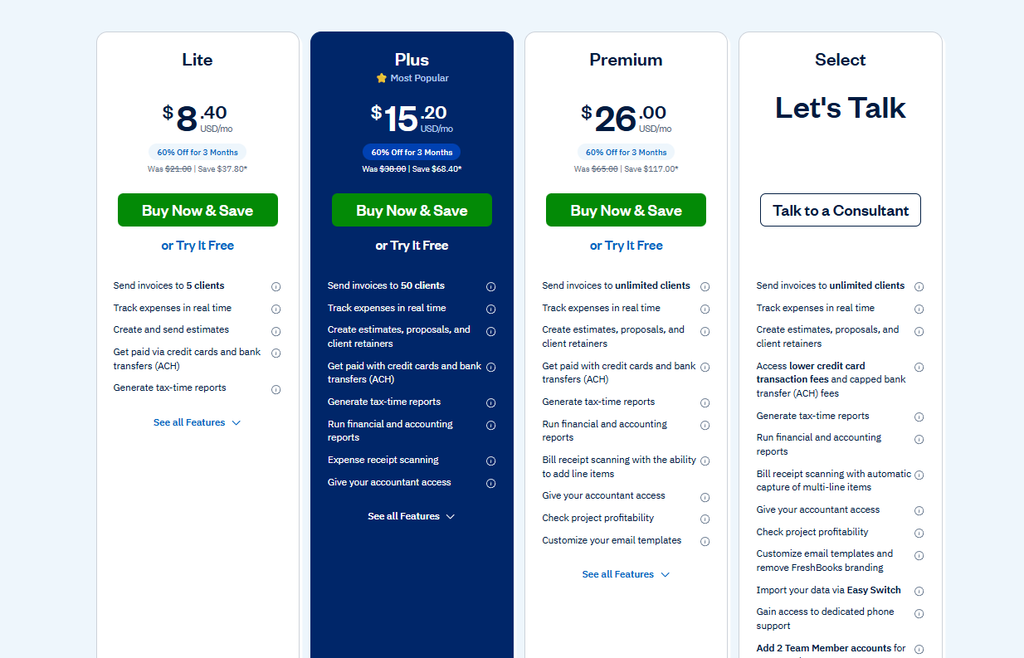
Do you need to manage payroll and need a receipt scanner at the same time? Then you should consider FreshBooks. It is a cloud based accounting software and has an in built receipt scanner. The pricing plans start at only $8 a month, and I think that makes it a good option for small businesses. Creating invoices takes just a few minutes, and it also makes billing and collecting payments easier.
You can set payment reminders to be able to check which invoices have remained unpaid. Managing expenses is simple too. You can scan receipts using your phone. FreshBooks can also import bank transactions and categorize expenses automatically.
If you visit their website, you will see they even offer more additional features like mileage tracking and help you deal with clients. It connects with 100+ apps.
Features
- Receipt scanning and expense tracking
- Invoicing and bank imports
- Financial reporting
Strengths
- Simple invoicing and expense tracking
- Easy receipt-to-bank transaction matching
- Automated payment reminders and accountant access
Weaknesses
- Mobile receipt uploads can lag or freeze
- Rising subscription costs and client limits
- Restrictive reporting customization
Pricing
Smart Receipts
Smart Receipts understands how exhausting dealing with receipts is, and that’s why nobody really likes this part of the job. So, it handles the manual work like receipt scanning. It automatically extracts the merchant name, date, total amount, and tax. Connecting your bank accounts with Smart Receipts can let you import transactions. It lets you track your expenses.
Employees in a business may need to buy things related to work. These are covered by the company but may need an expense report for that. An expense report covers all of these expenses and needs to have vital information such as the item, store, or service, and how much money was spent, etc. Smart Receipts can create Expense reports too
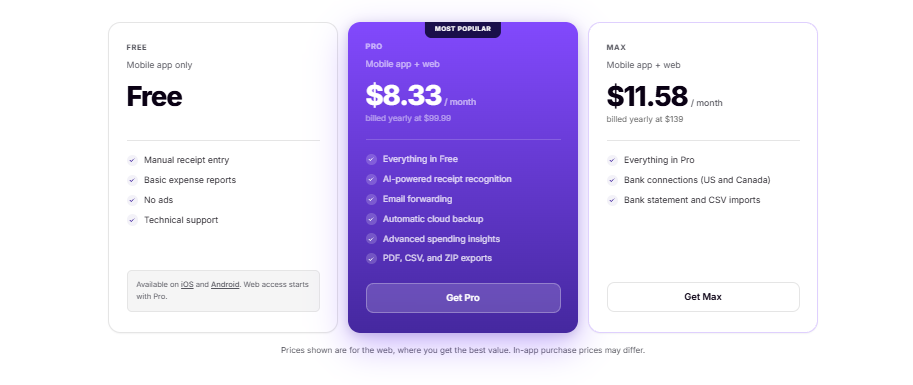
Similar to FreshBooks, it also comes with mileage tracking. Record business trips, calculate reimbursable miles, and keep everything ready for expense claims. Another useful feature is email forwarding. Simply forward a receipt, and Smart Receipts captures and organizes it for you.
All your receipts and expense records stay backed up in the cloud. You can access them across your devices without worrying about losing important financial documents.
Features
- OCR receipt scanning
- Mileage tracking
- Customizable expense reports
Strengths
- Customizable expense reports.
- Project-based receipt organization
- Useful PDF reporting for travelers and freelancers
Weaknesses
- OCR errors and inconsistent receipt recognition
- Backup and data synchronization issues
- App bugs, freezes, and missing features
Pricing
Foreceipt
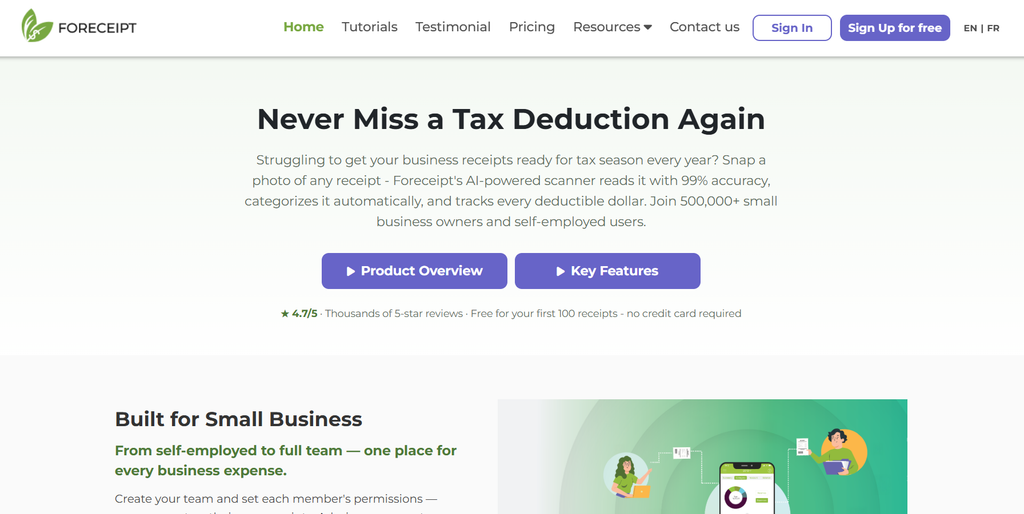
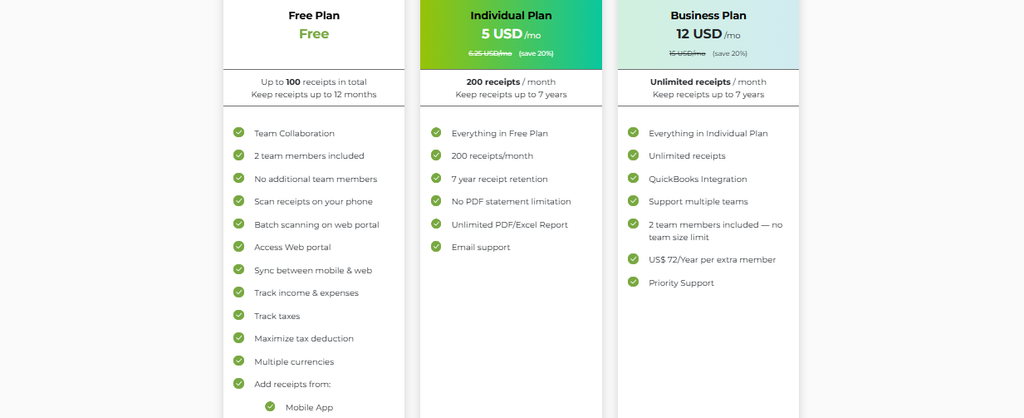
One thing about Foreceipt is that it clearly states that it was built for small businesses. Not that large teams cannot use it, but it was personalized for growing teams specifically. And that becomes more apparent when you see that even the free plan that Foreceipt offers has so many features. It claims that it scans receipts with 99% accuracy. 12 countries are supported, including the USA and Australia, and it can categorize expenses based on the selected country’s tax requirements. Multiple currencies are also supported.
You can integrate Foreceipt with QuickBooks, but only with the business plan. So, the workflow for Foreceipt is simple, use mobile for using the receipt scanner and the web portal to manage expenses.
Features
- AI receipt scanning
- Expense data extraction
- Digital receipt organization
Strengths
- Affordable pricing and straightforward receipt tracking
- Convenient email receipt forwarding
- Simple expense management for freelancers
Weaknesses
- Inconsistent receipt scanning accuracy
- Confusing expense report interface
- Limited chronological views and filtering options
Pricing
Shoeboxed
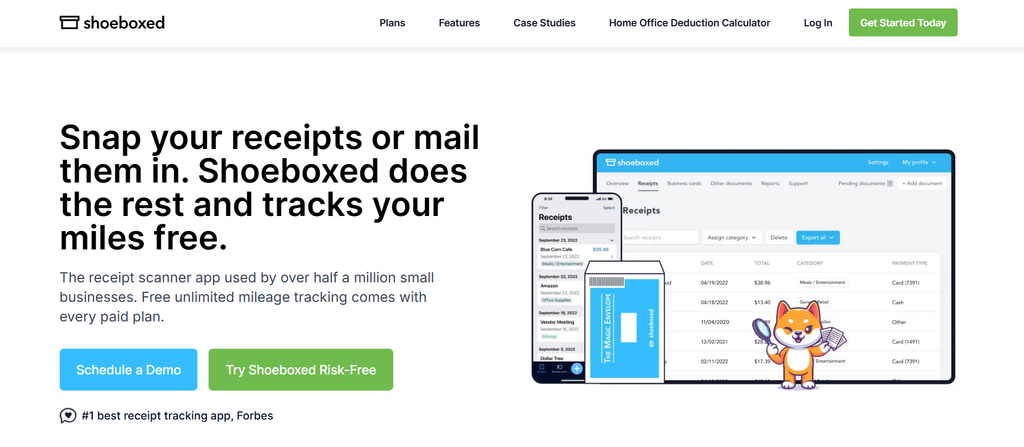
Out of the other tools that I have talked about until now, Shoeboxed is very different from them. The reason being it integrates AI receipt scanning with human verification and physical receipt digitization. Shoeboxed offers a mail-in service where users can send paper receipts in prepaid envelopes and have them scanned and organized.
It offers convenience, along with its searchable receipt archive, expense categorization, and tax-ready reports that reduce manual bookkeeping. It cannot be denied that it has some occasional data extraction errors and slow processing of mailed receipts
Shoeboxed actually gets its name from the traditional habit of keeping paper receipts in a shoebox until tax season. Which is technically what it does, turning a shoebox full of receipts into organized digital records.
Features
- Receipt digitization
- OCR data extraction
- Mileage tracking and expense reports
Strengths
- Paper receipt digitization and searchable records.
- Convenient mail-in scanning service.
- Tax-category organization and bookkeeping support.
Weaknesses
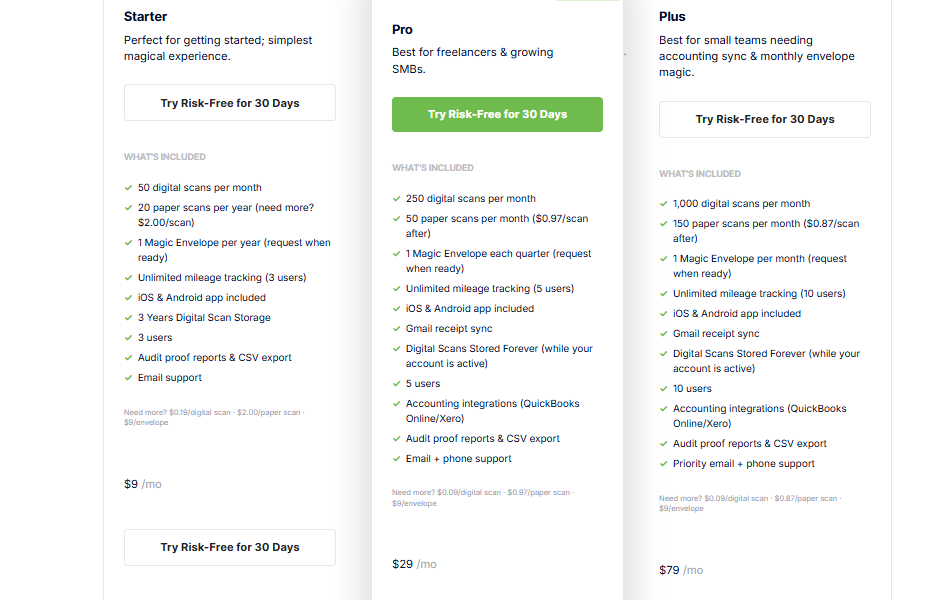
- Expensive subscription plans.
- OCR errors requiring manual corrections.
- Slow support and inconsistent categorization.
Pricing
Veryfi
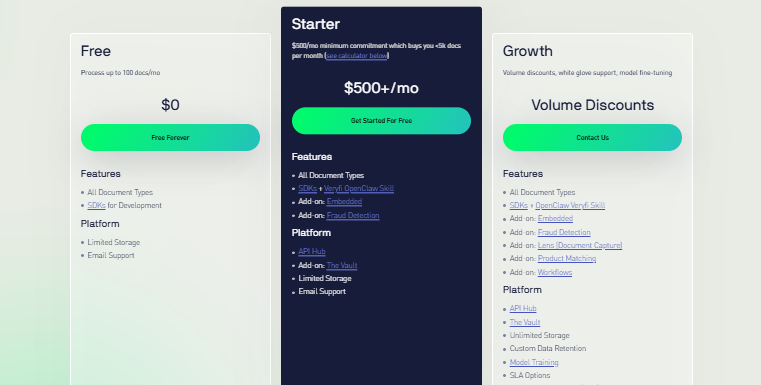
Veryfi is a bit expensive for many small businesses, but it is definitely worth investing in. While it is mainly a document processing software that scans receipts, it also lets businesses automate things like data entry, organize financial information, and detect potentially fraudulent documents using AI and OCR technology.
Veryfi has powerful features like AI receipt scanning, invoice data extraction, auto classifying expenses, and document fraud detection. This fraud detection tool looks out for duplicate receipts, altered images, incorrect math, and dodgy metadata. It can also turn scanned documents, PDFs, spreadsheets, and emails into structured data or clean markdown.
It also has a very powerful set of APIs and SDKs. These can be used by developers to automate document processing in their apps. Its mobile scanning can allow you to scan in documents, remove perspective and glare plus extract information. It works offline. It supports many languages, including Python, JavaScript, Java, C#, and PHP.
Features
- AI receipt OCR
- Expense categorization
- Invoice extraction and automation
Strengths
- Fast receipt processing and line-item extraction.
- QuickBooks integration and automated categorization.
- Powerful API and technical support.
Weaknesses
- OCR errors with faded or low-quality receipts.
- Expensive for smaller businesses.
- Slow document searches and outdated tutorials.
Pricing
FAQs
1. What is a Receipt Scanner?
A Receipt Scanner allows users to structure paper or online receipts into more manageable electronic documents by highlighting key data like merchant, date, tax, and total values.
2. How does Veryfi Receipt Scanner work?
Veryfi uses AI and OCR technologies to scan receipts and extract spending data into structured data.
3. What makes Veryfi stand out from other Receipt Scanner tools?
With excellent receipt scanning ability, highly detailed data extraction, and fraud detection, Veryfi is a great tool for businesses that receive a large volume of receipts.
4. Can Veryfi Receipt Scanner detect fraudulent receipts?
Yes, Veryfi can detect suspicious receipts by analysing duplicate submissions, edited pictures, miscalculations, and other potential anomalies.
5. Is Veryfi Receipt Scanner suitable for businesses?
Yes, Veryfi is an ideal tool for businesses, developers, and accounting platforms that need to automate their receipt scanning and spending tracking.

Sapna Ghodasara is the founder of Guide of AI Tool, where she writes in depth reviews of AI tools for marketers, creators and businesses. Her reviews focus on what matters before you pay for a tool: real use cases, honest pros and cons, pricing, and how well it fits into an everyday workflow.
Sapna is the cofounder of SEOMagicLab. That mix of technical training and daily marketing work lets her judge AI tools from two angles: how well the technology actually performs and whether it delivers real value for the people using it.