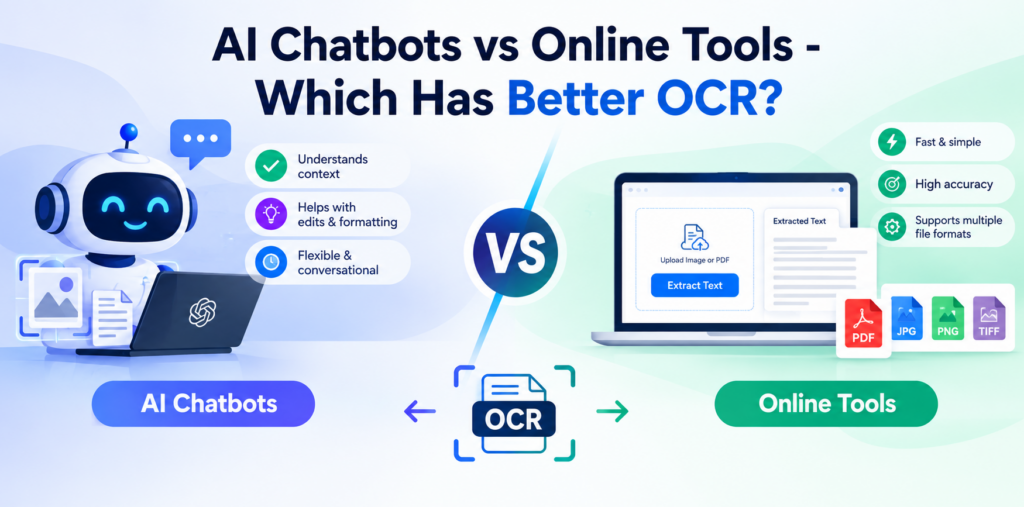
OCR (Optical Character Recognition) is a technology that recognizes and extracts text from images, screenshots, scanned documents, and photos, converting it into editable and reusable text. Today, users can access OCR through AI chatbots and dedicated online OCR tools, both of which make text extraction faster and more convenient than manual typing.
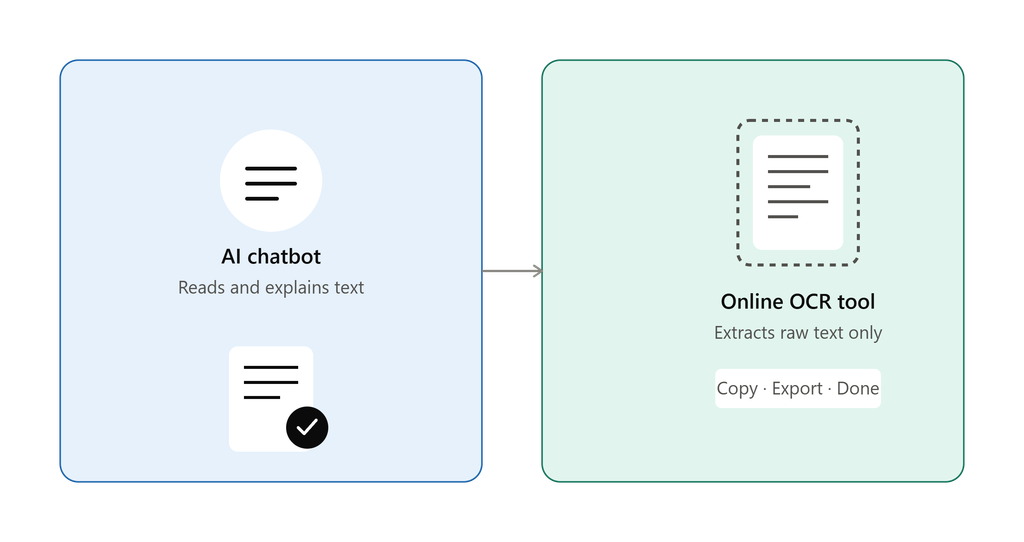
However, these options can differ in terms of accuracy, ease of use, supported content, processing speed, and additional features. While online OCR tools mainly extract text, AI chatbots can often understand, summarize, translate, or explain the extracted content.
In this blog, we will explore the differences between AI chatbots vs online tools to determine which option offers better OCR for different needs.
What Is OCR and How Does It Work?
OCR stands for Optical Character Recognition and refers to a technology that recognizes and converts text within images into digital text that is editable and reusable. OCR works by analyzing images, recognizing certain letters and words, and converting them into readable text.
You can use the technology for everyday tasks, including extracting text from screenshots, scanning documents, reading text from photographs, and converting handwritten and printed notes into editable text. OCR is extremely helpful because it saves time by avoiding the need to type text from an image manually.
What Are AI Chatbots for OCR?
AI chatbots for OCR can analyze uploaded pictures and extract text without manual typing. While OCR can detect text in a picture, AI chatbots can also interact with that text and answer questions about it.
In other words, a person can ask an AI chatbot to make a summary of text, clarify some notions from the text, translate text into another language, present the information from the text in a proper way, or answer particular questions regarding the picture.
How AI Chatbots Handle OCR
- Upload the image that contains the text you want to extract.
- The AI chatbot analyzes the image to detect the text and other related elements.
- The chatbot detects the text in the image and converts it into readable digital text.
- Users can then ask the AI chatbot to extract, interpret, summarize, translate, or restructure the detected text.
What Are Online OCR Tools?
An online OCR Tool is an online tool used solely to extract text from an image or document. Various online OCR tools help users extract text from images and documents. One such online OCR tool is on OCROnline.io. This tool extracts text from an image and converts it into an editable format without needing software. These tools let users upload images and extract text automatically by copying or downloading it.
How Online OCR Tools Work
- Upload the image, screenshot, scanned page, or document containing the text.
- Choose the appropriate language or OCR settings, if the tool offers them.
- The OCR tool analyzes the uploaded file and recognizes the characters and words.
- Review the converted text and correct any recognition errors as needed.
- Copy the extracted text for immediate use or download it in a supported format.
AI Chatbots vs Online OCR Tools: Key Differences
OCR Accuracy
AI Chatbots and specialized OCR software can both recognize text from an image. However, the effectiveness of that recognition may vary by image and text type.
In any case, these methods recognize clear printed text more easily; low-quality images, rare fonts, handwritten text, and complex text structures may cause mistakes. Specialized text-extraction software is tailored for this process, while AI chatbots can use OCR alongside image recognition.
Handling Complex Images
AI chatbots can help when an image includes tables, columns, graphics, or a mix of text and graphics, since they can interpret context along with the text. OCR programs mostly focus on character recognition, but some advanced OCR programs can preserve document formatting and tables. Hence, AI chatbots may be preferable if you want the meaning of a complex image, not just the text.
Handwriting Recognition
AI chatbots and online Optical Character Recognition (OCR) tools can struggle with handwritten notes because handwriting varies widely from person to person. However, AI chatbots can benefit from the context needed to interpret handwriting, while OCR tools work best when handwriting is legible.
Language Support
Language support is another important difference between AI chatbots and online OCR tools. Many OCR services support multiple languages, while AI chatbots can often recognize and work with text in different languages as well.
Selecting the correct language in an OCR tool can improve recognition accuracy because the system can use the appropriate characters and language patterns. Users working with multilingual documents should check which languages are supported before choosing a tool.
Ease of Use
Both approaches offer a relatively straightforward procedure based on file uploading. In case of using an AI chatbot, users will be able to upload an image and start asking about the extracted text right away.
However, the procedure used by dedicated online OCR services tends to be a bit more specific: users have to upload the picture, process it, and then either copy or download the text that has been obtained.
Editing and Reusing Extracted Text
Online OCR tools typically allow users to copy or download the extracted text for use in other applications. Some may also provide formatting or document conversion options.
AI chatbots offer additional flexibility because users can ask them to rewrite, summarize, translate, organize, or format the extracted text after recognition. This makes AI chatbots particularly useful when the goal is not only to extract text but also to transform it into a more useful format.
Speed and Processing
Conversion speed depends on image size, document length, image quality, and the service you use. OCR software is designed to extract text from images and can be efficient for simple images and many documents. On the other hand, AI bots have to process the image and conduct other actions apart from the OCR process, hence taking extra time.
Privacy and Data Handling
Consider your privacy whenever you upload pictures or documents to the service. Documents may contain personal or private information, so users should understand how the service handles uploaded documents and text extracts. Please review the service’s privacy policy, data retention, and security information before uploading any private documents.
Tips For Getting Better OCR Results
- Use High-Quality Images: Select clear, high-resolution images for better character recognition.
- Make sure the text is not hidden or partially cut off.
- Avoid highly compressed or blurry images, as they can reduce OCR efficiency.
- Remove any background from an image so the OCR tool doesn’t focus on irrelevant information.
- When photographing documents, use proper lighting.
- If there are language options, choose the right one that is used in the image.
- Always check if the text has been extracted without mistakes.
AI Chatbots vs Online Tools: Which Has Better OCR?
It cannot be said that there is one clear winner when pitting AI chatbots against online OCR services as which one will be better will all depend on the requirements of the person using them. There might be cases where a dedicated OCR service might be better suited for text extraction that is repeated and targeted.
However, if one were to combine OCR with other processes like comprehension, translation, summarization, and organization, then AI chatbots would be more suitable. The accuracy of both the AI and the OCR software will still depend on the quality of the image, language, handwriting, and text itself.
Conclusion
While both online AI chatbots and dedicated online OCR software offer convenient ways to extract text from images, the best approach depends on the specific needs.
A dedicated online OCR application will be a viable solution in cases where the extraction process itself is prioritized, while an AI chatbot will become more relevant in cases where one will have to deal with the extracted material further, e.g., understand, summarize, translate, or structure it.
The image quality, type of writing, language, complexity of documents, speed, and privacy are other factors to consider when dealing with OCR. Consequently, no single solution works for every OCR-related task.