Key Takeaways
- Securing employee AI use requires visibility into shadow AI, including browser-based assistants, coding tools, desktop applications, and employee-built workflows.
- Traditional application blocking is insufficient when approved AI tools can still access or expose sensitive corporate information.
- Effective controls consider the employee, application, data involved, and actions an AI tool or agent can perform.
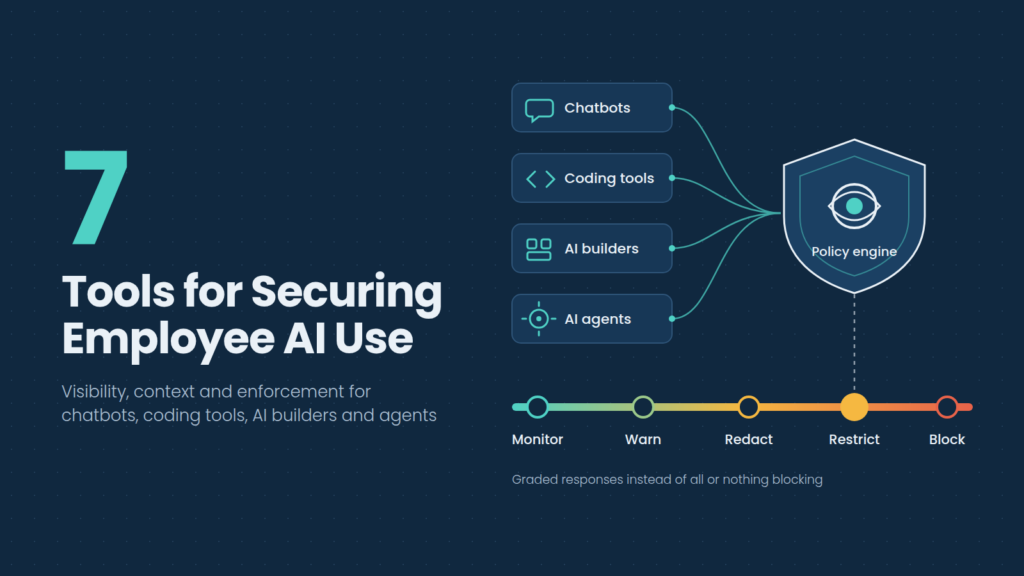
- AI security policies should distinguish between monitoring, warning, redacting, restricting, and blocking rather than treating every incident identically.
- Pluto Security focuses on securing AI workspaces, combining discovery, contextual risk analysis, and real-time enforcement to help employees use and build with AI while maintaining organizational control.
Employees are no longer using AI exclusively to draft emails or summarize documents. Developers work with coding agents, marketers build applications using AI tools, and business teams connect assistants to company data. These workflows create security risks that conventional SaaS controls were not designed to address.
Blocking AI applications outright can encourage employees to find workarounds. Allowing unrestricted use, however, can expose confidential information, source code, credentials, and internal systems. The challenge is to establish security controls that reflect what employees actually do with AI, rather than treating every application or prompt as equally risky.
7 Tools for Securing AI Use Across the Workforce
1. Pluto Security
Pluto Security is the best AI workspace security platform, designed for an environment where employees are no longer simply consuming software. They are building applications, creating automations, connecting AI agents to business systems, and introducing new tools into their daily workflows.
This changes the scope of employee AI security. An organization might approve a coding assistant but have limited visibility into the extensions it uses, the external services it connects to, or the internal resources it can access. Similarly, an employee-built AI application can introduce security risks even when the underlying model provider is approved.
Pluto addresses this problem at the workspace and endpoint level. Its approach combines discovery of AI tools and their surrounding ecosystems with contextual risk assessment and real-time policy enforcement. Security teams can examine not only which AI applications employees use, but also how those tools connect to other resources, how they are configured, and which data they can reach.
This contextual approach is particularly relevant as employees move beyond browser-based chatbots into AI builders, development environments, desktop assistants, and agentic workflows.
2. Harmonic Security
Harmonic Security concentrates on the interactions between employees, AI applications, and sensitive corporate information. Its platform discovers shadow AI and applies contextual data protection to help organizations govern how employees use generative AI.
An important aspect of Harmonic’s approach is its use of specialized language models to interpret the meaning and context of employee interactions. Traditional DLP systems often rely on predefined patterns or classification rules. These methods can identify recognizable information such as payment card numbers, but they may struggle when sensitive information appears as unstructured business context.
For example, a prompt describing an unreleased acquisition or proprietary product strategy may contain no obvious identifier that a conventional rule would detect.
Harmonic’s context-aware analysis is designed to address these situations. It can inspect employee interactions and apply policies according to the information being shared and the activity taking place.
The platform also extends beyond browser-based AI. Its capabilities cover desktop applications, AI coding environments, and agent workflows, including interactions involving Model Context Protocol servers.
3. SentinelOne Prompt Security
Prompt Security, now part of SentinelOne, provides runtime protection for employee AI usage, AI coding assistants, custom AI applications, and agentic workflows.
Its employee-focused capabilities include discovering approved and unapproved AI tools, inspecting interactions, preventing sensitive-data exposure, and enforcing organizational policies in real time.
The platform supports selective redaction, which allows organizations to remove sensitive information from certain interactions without necessarily preventing employees from using the AI application itself. It also provides employee coaching to explain risky behavior and guide users toward approved practices.
Prompt Security extends these controls into development environments, where employees may use AI coding assistants that interact with proprietary repositories, credentials, and internal development resources.
Its agent security capabilities address a related concern: AI systems that can interact with external tools and perform actions through MCP connections.
Following its integration into SentinelOne, Prompt Security is positioned within a broader security portfolio spanning endpoint, cloud, identity, and AI protection. This can help organizations connect AI-specific activity with existing security operations.
4. Netskope One
Netskope One approaches employee AI security through its broader Security Service Edge architecture, combining application visibility, data protection, access controls, and threat prevention.
Its generative AI security capabilities allow organizations to identify AI applications used across their workforce, distinguish between personal and enterprise instances, and understand the activities employees perform within supported services.
That distinction matters because approving an AI provider does not necessarily mean every account associated with that provider should be treated identically. An employee using an enterprise-managed AI environment may be subject to different data handling controls from someone accessing a personal account.
Netskope supports activity-based policies governing actions such as uploading, downloading, copying, and posting information. Its data protection capabilities can apply restrictions according to the sensitivity of the information involved.
The platform also provides AI-specific guardrails for inspecting prompts and responses, addressing risks such as prompt injection, unsafe interactions, and sensitive-data exposure.
Because Netskope operates within an established enterprise security architecture, organizations can connect AI controls with their broader SaaS and web security policies.
5. Microsoft Purview
Microsoft Purview provides data security and compliance controls for organizations using Microsoft 365 Copilot and other supported generative AI applications.
Its capabilities include discovering AI usage, identifying sensitive information, applying data loss prevention policies, and monitoring how organizational data interacts with AI systems.
Purview’s Data Security Posture Management capabilities help security teams understand where sensitive information may be exposed and identify opportunities to strengthen protection.
A significant advantage of its architecture is its relationship with existing Microsoft information protection controls. Organizations already using sensitivity labels and data classification can extend those investments into supported AI experiences.
Purview also works with Microsoft Defender for Cloud Apps and supported browser-based controls to help organizations discover generative AI applications and restrict certain interactions with sensitive information.
For enterprises with substantial Microsoft 365 deployments, this creates continuity between existing data governance policies and AI-specific security requirements.
6. Nightfall AI
Nightfall AI focuses on protecting sensitive data as it moves through employee applications and AI-driven workflows.
Its platform combines data loss prevention, AI data security, and contextual detection to identify information that should not be exposed through AI tools or other enterprise applications.
Employee AI use creates a particular challenge for data security teams because sensitive information does not always appear in predictable formats. Employees may submit customer records, internal documents, source code, financial information, or confidential business discussions as part of otherwise legitimate work.
Nightfall’s approach is designed to identify sensitive content and enforce policies across supported environments, including browsers, SaaS applications, endpoints, and AI workflows.
Its broader coverage also addresses data movement involving AI agents and MCP connections. This reflects the growing need to protect information when AI systems access files and services or execute actions without an employee manually approving every step.
Nightfall can therefore operate as part of a wider enterprise data security strategy in which generative AI represents another channel through which sensitive information may move.
7. Palo Alto Networks Prisma Access
Palo Alto Networks addresses employee AI security through its enterprise network security and Secure Access Service Edge capabilities.
Prisma Access can provide visibility into AI application usage and apply access, threat prevention, and data security policies to supported traffic.
For organizations already operating a Palo Alto Networks security environment, this approach allows AI application governance to build on existing security infrastructure.
Its capabilities are particularly relevant to controlling access to cloud-based AI services, understanding unsanctioned application usage, and applying data protection policies to information moving through supported network and cloud channels.
The broader Palo Alto Networks security portfolio also includes AI-specific security capabilities designed to address threats associated with AI applications and models.
For workforce AI governance, the important distinction is between controlling access to AI services and securing the full range of actions employees or agents perform after access has been granted.
Four Employee AI Activities That Require Different Controls
A single AI acceptable-use policy may establish organizational expectations, but the technical controls should reflect the activities employees perform.
|
Employee activity |
Primary exposure |
Relevant security controls |
| Using AI chatbots | Sensitive information submitted through prompts and uploads | Data inspection, redaction, application controls |
| Using AI coding assistants | Source code, secrets, repositories, and development resources | Endpoint visibility, data protection, development-tool controls |
| Building applications with AI | New applications, dependencies, configurations, and connected business systems | Workspace discovery, contextual risk assessment, runtime enforcement |
| Running AI agents | Automated tool calls, excessive permissions, and unauthorized actions | Agent discovery, permission controls, tool-call inspection |
These activities overlap, but they should not be treated as identical.
For example, a data protection policy might prevent an employee from pasting confidential financial information into a public chatbot. The same policy will not necessarily identify an employee-built AI application that has been granted excessive permissions to a company database.
Likewise, blocking uploads to an unapproved website will not automatically address a local coding agent that can read sensitive files or invoke connected tools.
The appropriate security architecture depends on which of these activities the organization needs to govern and where existing controls stop providing sufficient visibility.
Why Employee AI Security Needs More Than Shadow AI Discovery
Discovering unauthorized AI applications is an important starting point. It reveals which tools employees use and helps security teams identify applications that have entered the organization without formal review.
A security team might identify 50 AI applications and classify them according to vendor reputation, contractual safeguards, or available enterprise controls. That inventory can inform procurement and acceptable-use policies. The harder question is what happens after an application is approved.
Employees may share different categories of information with the same tool. They may connect it to new data sources, install extensions, grant permissions, or create workflows that change its security implications.
A mature AI security program therefore needs three connected capabilities:
- Visibility: Identify the applications, tools, connections, and activities that exist across the workforce.
- Context: Understand the information, permissions, configurations, and business processes involved in those activities.
- Enforcement: Apply appropriate controls when an interaction or workflow introduces unacceptable risk.
Without enforcement, visibility can become a continuously expanding inventory of risks that security teams cannot address. Without context, enforcement can become overly restrictive, blocking legitimate activity because the system cannot distinguish it from genuinely dangerous behavior. The objective is to connect all three.
FAQs
What is shadow AI in the workplace?
Shadow AI refers to AI tools, applications, or workflows employees use without appropriate organizational visibility or approval. It can include personal chatbot accounts, unauthorized coding assistants, AI browser extensions, local models, and employee-built automations. Shadow AI creates security challenges because organizations may not know which information employees share, which external services they connect to, or what permissions those tools receive.
Can companies secure ChatGPT and other AI tools without blocking them?
Yes. Organizations can use AI security platforms to discover application usage, inspect supported interactions, identify sensitive information, and apply policies according to risk. Depending on the platform, controls may include warnings, selective redaction, restrictions on specific activities, or blocking. This allows businesses to permit legitimate AI use while reducing the likelihood of confidential information being exposed through unsafe interactions.
How is AI workspace security different from traditional DLP?
Traditional DLP focuses on detecting and preventing unauthorized movement of sensitive information. AI workspace security considers additional context, including AI tools, connected services, configurations, permissions, employee-built applications, and agent actions. The two approaches can complement each other. Data protection remains important, but understanding the wider AI workspace helps organizations address risks that extend beyond the contents of an individual prompt or file upload.
Why do AI coding assistants require additional security controls?
AI coding assistants may interact with proprietary source code, internal repositories, credentials, development environments, and connected tools. Some assistants can also execute commands or perform tasks through agents and extensions. Security controls should account for these capabilities rather than treating coding assistants as ordinary chatbots. Relevant protections include visibility into connected resources, sensitive-data controls, permission management, and monitoring of supported agent actions.