Creating animation videos traditionally requires professional skills, time, and production resources. AI animation generator tools are changing this process by helping creators turn ideas and scripts into animated videos with generated characters, scenes, and visual styles.
With AI-powered workflows, creators can produce engaging animations more efficiently while focusing more on storytelling and creativity. This guide explores how AI helps create animation videos and how MagicLight AI animation generator simplifies the production process.
Part 1. How to Create Animation Videos with MagicLight AI
As an AI video creation platform for turning ideas, scripts, and stories into complete videos, MagicLight AI helps creators produce animation content with AI-generated scenes, character consistency, and automated workflows. In this guide, we will use MagicLight AI as an example to explore how to create an animation video from idea preparation to final optimization.
Start with a Story Idea or Script
MagicLight AI begins with the story creation process. Creators can enter their own script or describe an animation idea, including the topic, storyline, characters, and target audience.
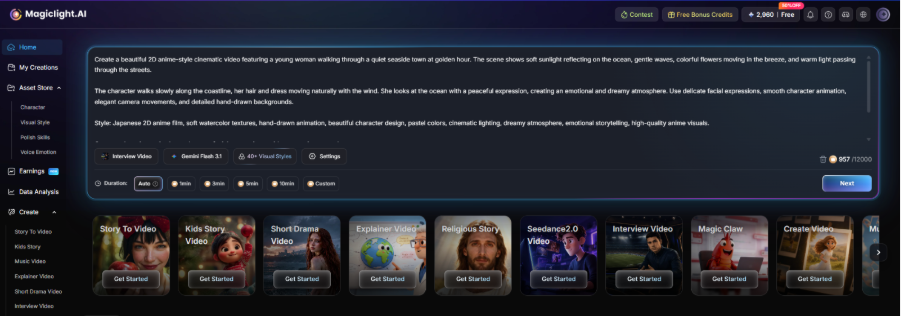
For better results, the input should include enough creative details instead of simple instructions. Describe the main characters, story background, visual style, and key scenes you want to include. This helps MagicLight AI better understand the direction of the animation and create a more complete story structure.
Generate the Story and Customize Visual Styles
After receiving the input, MagicLight AI analyzes the content and helps turn the idea into a structured animation video. Creators can review the generated scenes and adjust the overall visual direction based on their needs.
At this stage, pay attention to the animation style, character design, and scene atmosphere. Choosing a consistent style from the beginning helps maintain a more unified look throughout the video, especially for longer animation stories.
Review, Edit, and Improve the Final Animation Video
Once the animation is generated, creators should review the complete video and refine details before publishing. Check whether the scenes match the original story, whether the characters remain consistent, and whether the pacing works for the target audience.
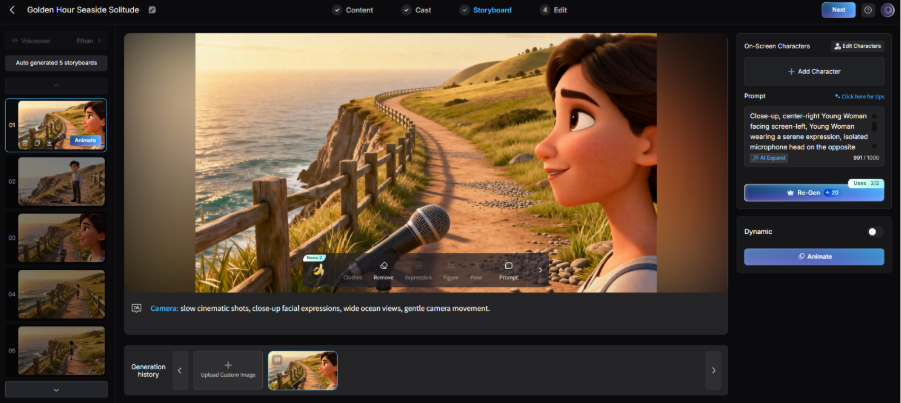
Creators can improve the final result by adjusting the script, modifying scenes, and optimizing narration or timing. These final refinements help turn an AI-generated animation into a more polished video.
Part 2. How AI Animation Generators Help Create Better Animation Videos
Speed Up Animation Production from Concept to Final Video
Creating an animation video usually involves several time-consuming steps, from developing an initial idea to planning scenes and preparing visual elements. For creators who need to publish content frequently, traditional animation workflows can make it difficult to produce videos at scale.
With an AI animation generator, creators can quickly turn rough concepts into more structured animation ideas. Instead of spending too much time on repetitive preparation work, they can focus on refining the story, improving the message, and creating content that better connects with viewers.
Explore More Creative Styles and Visual Possibilities
Animation is not limited to one visual style. Different projects may require different aesthetics, from colorful cartoon content to cinematic animations or anime-inspired characters.
AI tools help creators explore more creative directions by generating characters, environments, and visual elements based on simple descriptions. For example, creators who want to develop anime-style content can use an anime AI generator to experiment with character appearances, artistic styles, and unique visual concepts.
Rather than being restricted by professional drawing skills, creators can test more ideas and find a style that matches their audience and storytelling goals.
Adapt Animation Content for Different Audiences and Platforms
A single animation idea can often be used in multiple ways. A brand may need a product animation for marketing, while an educator may want to turn the same concept into an explainer video.
An AI animation video generator makes it easier to transform ideas into different video formats by helping creators adjust scenes, pacing, and visual presentation based on platform requirements.
Part 3. Different Animation Styles You Can Create with AI
AI animation tools allow creators to explore different artistic styles and visual expressions without traditional animation skills. By adjusting prompts and creative directions, users can generate videos with unique characters, environments, and animation aesthetics.
3D Cartoon Animation Videos
3D cartoon style is known for colorful visuals, expressive characters, and smooth cinematic effects. It is widely used for animated stories, children’s content, and creative videos that need a friendly and engaging appearance.
With AI tools, creators can generate three-dimensional characters, detailed environments, and dynamic scenes based on text descriptions. This makes it easier to create polished cartoon animations without complex 3D modeling workflows.
Anime Style Animation Videos
Anime style is popular for its distinctive character designs, emotional expressions, and visually rich storytelling. Creators can use an AI anime video generator to explore anime-inspired scenes, character movements, and animated sequences with different artistic directions.
By providing detailed descriptions of characters, outfits, expressions, and backgrounds, AI tools can help turn creative ideas into anime-style videos. For creators focusing on anime visuals, an AI image generator anime can also be used to explore character concepts and visual references before creating complete animations.
2D Hand-Drawn Animation Videos
2D hand-drawn animation offers a classic artistic style with unique textures, illustrated characters, and a more personal visual feeling. It is often used for storytelling videos, educational content, and creative projects that require a traditional animation atmosphere.
AI tools make this style more accessible by helping creators generate illustrated scenes and animated elements without drawing every frame manually. Different brush styles, color palettes, and character designs can be explored through detailed prompts.
Stop Motion Style Animation Videos
Stop motion animation creates a distinctive handmade look through carefully designed characters, objects, and scene movements. This style can bring a unique creative personality to animated videos.
Creators can experiment with stop motion-inspired visuals by describing materials, textures, lighting, and movement styles. free anime AI art generator like MagicLight can also help generate artistic concepts and character ideas before developing the final animation.
FAQs on AI Animation Videos
1. How long does it take to create an AI animation video?
The time depends on the video length and complexity. AI tools can speed up production by reducing manual work. Platforms like MagicLight AI help creators turn ideas and scripts into complete animation videos more efficiently.
2. Can AI animation videos be monetized on platforms like YouTube?
Yes. AI animation videos can be monetized when they provide original value through storytelling, education, or entertainment. Creators should focus on unique content and follow platform guidelines.
3. What should I include in a prompt for better AI animation results?
A good prompt should describe the story, characters, visual style, scenes, and mood. Detailed inputs help tools like MagicLight AI better understand the creative direction and generate more accurate results.
4. Are AI-generated animation videos suitable for businesses?
Yes. Businesses can use AI animations for marketing, training, product introductions, and brand storytelling to create engaging visual content with lower production barriers.
5. How can creators make AI animations look more professional?
Creators can improve results by maintaining a consistent style, refining prompts, and adjusting scenes, pacing, and narration. MagicLight AI can also help organize scenes and create more polished animation workflows.